Enterprise Governance for Copilot Cost Control
This page is for org and enterprise admins. Goal: control spend without inventing controls GitHub does not document.
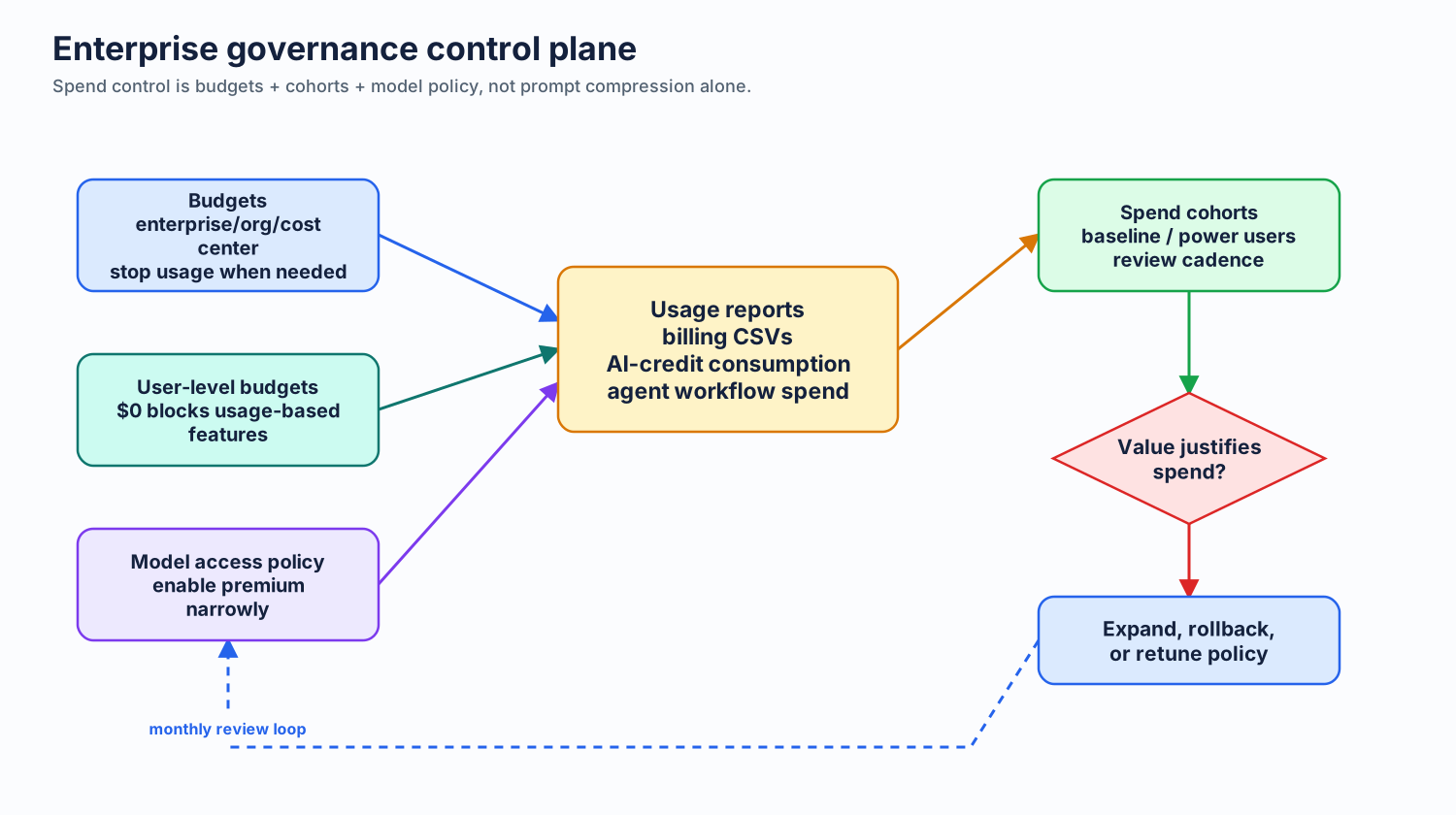
What Actually Controls Spend
Three levers matter most:
- budget ceilings
- user-level budget control
- model availability
Prompt compression still matters, but it is a usage-efficiency lever. It is not an admin billing control.
One timing rule matters: June 1, 2026 is the cutoff. After that, Business and Enterprise governance shifts to AI-credit usage under usage-based billing. Treat premium requests as legacy transition context, not as the main planning model.
1. Set Budgets First
Use GitHub's usage-based billing guidance for organizations and enterprises and metered product budget setup docs.
Key points from GitHub docs for Business and Enterprise after June 1:
- budgets can be set at organization, enterprise, or cost-center scope
- you can enable stop usage when budget is reached
- user-level budgets exist, and a $0 user budget means no access to usage-based features
That budget system is the direct spend cap for AI-credit usage at enterprise, organization, cost-center, and user scope.
If budget and cost-center segmentation becomes hard to manage by hand, look at amgdy/copilot-finops-automation. It treats Copilot FinOps as code: one version-controlled YAML config defines AI-credit spend policies and team-to-cost-center mappings, then GitHub Actions validates the config, previews changes with dry runs, applies budgets idempotently, syncs team membership into cost centers, and writes audit/current-state reports.
Why admins should care: reviewed pull requests beat ad hoc console edits, dry runs reduce mutation risk, scheduled reconciliation catches drift, and cost-center or user-level budget materialization gives tighter segmentation for teams with different spend patterns. Use a private repo or private fork for live enterprise config; keep real enterprise slugs, teams, cost centers, user logins, budget numbers, reports, logs, and tokens out of public branches.
Important caveat: budgets do not make prompts smaller. They do not reduce tokens per prompt. They cap AI-credit spend.
Practical default:
- set a nonzero test budget for rollout
- enable alerts early
- enable stop usage once reporting looks sane
- review monthly, not just after overruns
2. Use User-Level Budgets for Per-User Tightening
For Business and Enterprise after June 1, the clean per-user cap is the user-level AI credit budget documented in GitHub's usage-based billing guidance. GitHub's docs explicitly say a user-level budget of $0 means that user gets no access to usage-based features.
Admin mindset: think in AI-credit usage first. Model choice, chat depth, agent duration, and user-level budget are now direct spend controls.
Do not claim a documented org-level per-user model toggle for Copilot Chat in IDEs. GitHub's docs describe budgets, cost centers, and allowance management. They also document org and enterprise model access policy at the member level, but not a within-one-org per-user model matrix you can arbitrarily tune model-by-model.
Practical pattern:
- baseline group gets a low user-level AI-credit budget
- power users get more only with clear job need
- monthly review: downgrade users whose usage does not justify the extra cost
Build cohorts from actual spend, not guesswork:
- download historical Copilot billing or usage CSVs from GitHub
- upload the CSV to Copilot Billing Preview
- inspect the usage bands it surfaces, such as power users, high-usage users, baseline users, and low-usage users
- map those cohorts to different budget defaults, review cadence, and escalation paths
Why this matters: admins should not give every developer the same AI-credit ceiling when the spend profile is visibly different. Cohorts let you keep broad access for normal users, protect budget for people doing real agent-heavy work, and catch inactive or low-value usage before it becomes a pooled-budget surprise.
Post-June 1 admin tips:
- watch long chat and agent sessions because repeated turns now accumulate AI-credit cost directly
- monitor user-level budgets closely because $0 removes access to usage-based features
- remember code completions and next edit suggestions are not billed in AI credits, so do not treat all Copilot activity as equal cost
- review model choice regularly because chat-style interactions now consume AI credits based on model and tokens
- keep terse repo instructions in IDE workflows because lower output volume still reduces AI-credit burn even when billing moves off request counts
Legacy note: if you are still preparing customers before June 1, premium request management explains the outgoing control model. Use that only as transition guidance.
3. Review Models Before You Enable Them
Use Configuring access to AI models in Copilot.
GitHub documents that organization owners and enterprise owners can enable or disable access to AI models for members. Treat that as the supported model-governance control.
That is not the same thing as finely tuned per-user model toggles inside one org. For different org-level model policies or separate billing boundaries, separate organizations can still be useful. Use that only when the boundary is worth the overhead.
Practical review checklist:
- which workflows actually need premium models
- which teams produce measurable value from them
- which users can stay on Auto or included models
- what usage report you will inspect after enablement
- what rollback rule you will use if spend jumps without quality gain
Bad rollout pattern: enable every premium model for the whole org because a small group asked for one hard task.
Better rollout pattern: approve model access in stages, then compare usage and output quality before widening.
4. Keep Custom Instructions in the Right Scope
GitHub documents repository instructions for IDEs and GitHub.com in Adding repository custom instructions for GitHub Copilot and the IDE-specific companion page linked there.
GitHub documents organization instructions in Adding organization custom instructions for GitHub Copilot.
Important scope rule from GitHub docs:
- repository custom instructions are valid repo-level guidance
- organization custom instructions are currently supported for Copilot Chat on GitHub.com, Copilot code review on GitHub.com, and Copilot cloud agent on GitHub.com
- do not assume organization instructions apply in IDEs
That last point matters for cost control. If you want terse behavior in VS Code or JetBrains, put the always-on guidance in repository instructions, not only in org instructions.
Practical split:
- org instructions: broad policy tone, review reminders, cross-repo defaults for GitHub.com surfaces
- repo instructions: concrete coding, build, and terseness rules that must apply in IDE workflows
- path-specific instructions: narrow local rules where extra context pays for itself
5. Separate Orgs Can Work, but Treat It as a Caveated Workaround
GitHub's model-access and billing controls make separate organizations a possible way to maintain different org-level model policies or billing boundaries.
This can be useful when you need different org-level model policies or distinct billing boundaries for different user populations and your current org structure already matches those groups.
But this is a caveated workaround, not a magic governance feature.
Tradeoffs:
- more admin overhead
- license-assignment complexity
- awkward fit if users span many orgs
- SCIM and cost-center structure may drive the answer more than Copilot alone
Use separate orgs only when the policy or billing boundary is worth the operational cost. It is a fallback, not the first choice.
6. Measure the Right Thing
Use GitHub usage reports and AI-credit reporting from the billing docs above. Ask four questions:
- which teams exceed baseline spend most often
- which users drive the most AI-credit usage
- which models correlate with better outcomes vs simple habit
- which agent workflows create large spend without commensurate delivery value
Supplemental benchmarking can help when comparing model quality and price posture. llm-stats.com is useful as an independent reference point. Treat it as supplemental benchmarking, not official GitHub guidance and not a substitute for your own Copilot usage reports.
7. June 1 Cutover Checklist
If you are preparing customers for the June 1 shift, do this first:
- move admin guidance from request counters to AI-credit budgets
- build spend cohorts from historical CSVs before assigning user-level or pooled budgets
- decide which users need tight user-level budgets and which teams can share a broader pooled budget
- review model availability before frontier models become direct AI-credit spend
- remind teams that code completions and next edit suggestions stay outside AI-credit billing
- watch long chat and agent workflows first because they become the fastest spend amplifiers
Recommended Enterprise Default
- use Auto as the default model path
- set budgets before broad rollout
- segment users into spend cohorts from historical CSVs, then tune budget defaults by cohort
- use user-level AI credit budgets when you need tighter per-user control
- consider FinOps-as-code automation when manual cost-center and budget edits become risky
- review premium models before enablement
- keep repo instructions small so IDE workflows inherit the right defaults
- use separate org segmentation only if cost-center boundaries already support it
This is boring on purpose. Cheap defaults first. Premium access by exception. Measurement before expansion.
Next: Outcome per Token →