Part 1: Why Tokens Matter
1.1 What Are Tokens?
Tokens are the fundamental units that large language models read and write. They're not words, not characters — they're subwords, created by an algorithm called Byte-Pair Encoding (BPE).
How BPE works
- Start with raw bytes (256 possible values)
- Find the most frequent byte pairs in the training data
- Merge those pairs into new tokens
- Repeat until the vocabulary reaches ~100K tokens
The result: common English words become single tokens, while rare or long words get split into pieces.
Examples
| Text | Tokens | Count |
|---|---|---|
hello |
hello |
1 |
unhappiness |
un + happiness |
2-3 |
authentication |
authentication |
2-3 |
I met a huge dog |
I met a huge dog |
5 |
Sure, I'd be happy to help you with that! |
(each word/punctuation) | ~10 |
That last example — 10 tokens of zero information. This is the core insight behind token optimization.
Key fact: 8,311 of the 10,000 most common English words tokenize as a single token in the Claude 3 tokenizer. Common words are cheap. Filler words are still 1 token each — and they add nothing.
1.2 Why You Should Care
Every token you send or receive has a cost. Here's how:
| Dimension | Impact |
|---|---|
| Cost | Tokens = money. API pricing is per-token. GitHub Copilot usage limits are token-based. Critical asymmetry: output tokens cost 5× more per token than input tokens (Anthropic: $1/$5 Haiku, $3/$15 Sonnet, $5/$25 Opus per MTok). Copilot UBB uses the same bucket structure. This means every unwanted sentence in a response costs 5× what that same sentence would cost in your prompt. Output control has the highest per-token ROI of any technique in this guide |
| Rate limits | Fewer tokens per request = more requests per minute before hitting caps |
| Context window | Finite space shared between input (your prompt + context) and output (the response). Waste input tokens → less room for output |
| Speed | Fewer input tokens = faster time-to-first-token. You literally get answers faster |
| Billing | As of June 1, 2026, GitHub Copilot bills usage as usage-based billing (UBB). Each interaction is metered in three buckets — input tokens (prompt + context + history), output tokens (the response), and cached tokens (reused context, billed at ~10% of input rate). Cost = (input × input rate) + (cached × cache rate) + (output × output rate). Business and Enterprise seats include pooled AI credits ($30/seat for CB, $70/seat for CE) shared across the org. Code completion stays unlimited |
The compound effect: Most of your input tokens are not from what you type — they come from file context, conversation history, system prompt, and MCP tool schemas. Your typed prompt is typically 5–100 tokens of a total input that can reach 5,000–50,000+ in agent mode. The biggest input levers are structural (instruction file size, tab management, context scoping). The biggest cost-per-token lever is output: 5× pricing premium, directly addressable with one line in copilot-instructions.md.
1.3 How GitHub Copilot Uses Tokens
Understanding what Copilot does behind the scenes helps you optimize:
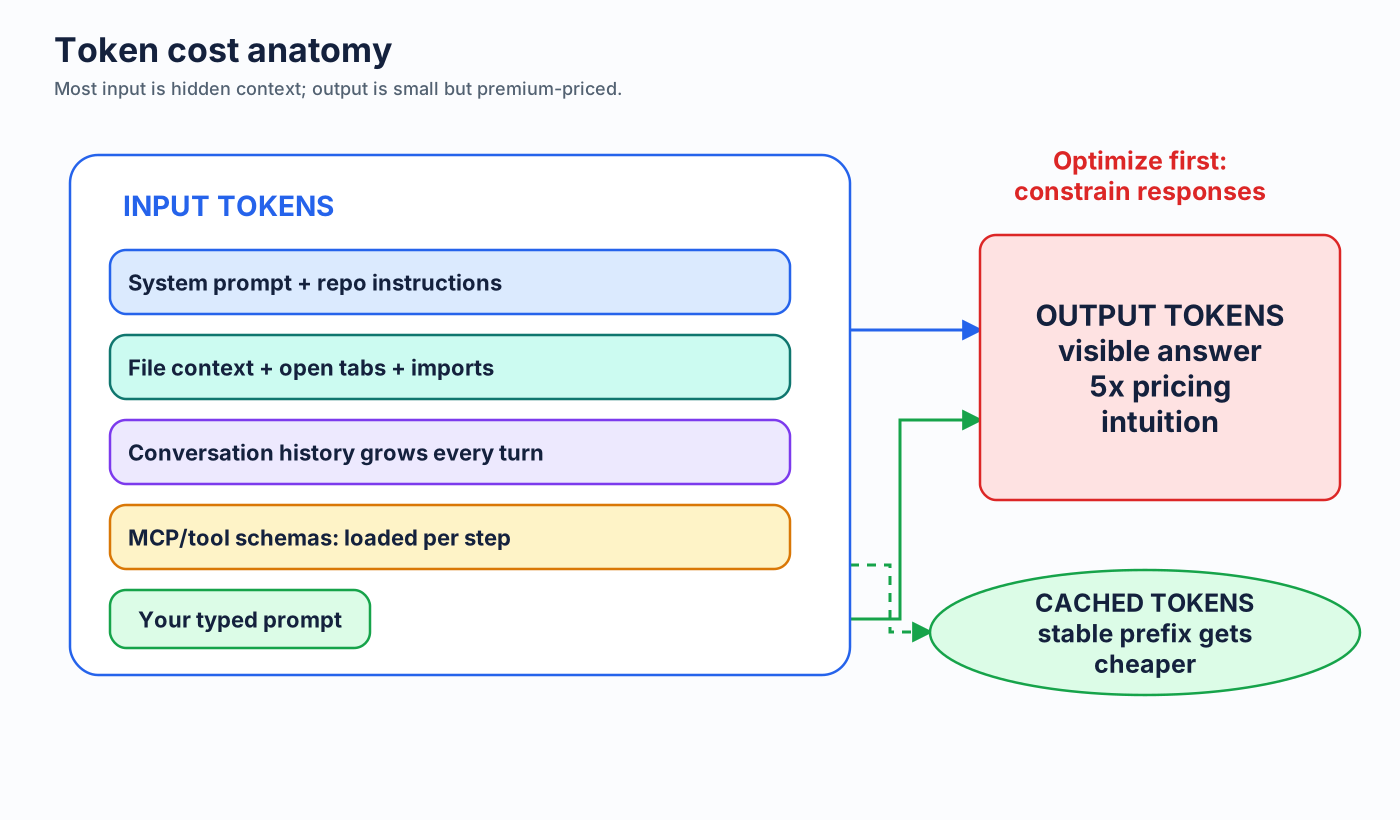
- System prompt: Copilot's own instructions (you can't control this)
copilot-instructions.md: Your project-level instructions — loaded on every interaction- File context: Files you reference with
#file, plus files Copilot auto-includes (open tabs, imports, nearby files) - Conversation history: All previous messages in the current conversation
- Your prompt: What you actually type
Hidden overhead: Copilot adds context you don't see — repo structure, file contents, import graphs. This is why your 20-word prompt might consume 2000+ input tokens.
Coding Agent multiplier: The GitHub Coding Agent runs multi-step sessions. Each step involves reading files, making decisions, writing code. A single issue-to-PR session can consume tens of thousands of tokens. Savings compound across those steps.
1.4 Who This Guide Is For
- GitHub Copilot Chat users — the primary audience. Most techniques apply here
- GitHub Copilot Inline/Edits users — some techniques apply (limited prompt control)
- GitHub Coding Agent users — high-value audience. Token savings compound across long sessions
- Anyone paying attention to efficiency — even if you're not hitting limits, faster responses and cleaner interactions are worth it
Next: Prompt Compression →