2.3 Context Management — Control What Gets Sent
2.3.1 System Instruction Compression
Your .github/copilot-instructions.md file is injected into every single Copilot interaction. Every word in it costs tokens on every prompt.
Note — related but distinct conventions.
.github/copilot-instructions.mdis GitHub Copilot's native repo-level instruction file.AGENTS.mdis a broader cross-tool convention that Copilot also reads. They are not the same file, and they can legitimately coexist (e.g.AGENTS.mdshared across multiple AI tools,copilot-instructions.mdfor Copilot-specific rules). What they have in common is that both function as always-on context — every token in either file is paid on every interaction. The compression and pruning techniques in this section apply equally to both. If your repo carries duplicated content across the two, that duplication is paid twice; deduplicate ruthlessly. See Part 2.6 for the research on what to keep.
This makes it the highest-leverage file to optimize. A 500-word instruction file at ~700 tokens means 700 tokens burned on every interaction — before you even type your question.
Before — natural English (~30 tokens):
You should write terse responses like a caveman. Make sure all technical substance
remains exact. Only remove unnecessary filler words. Drop articles and hedging.
Use fragments when appropriate. Keep code unchanged. Use short synonyms where possible.
After — compressed (~12 tokens):
Terse like caveman. Technical substance exact. Only fluff die.
Drop: articles, filler (just/really/basically), pleasantries, hedging.
Fragments OK. Short synonyms. Code unchanged.
Savings: 60%. Multiply by every interaction in a session. Over 50 interactions, that's 900 tokens saved from this one file alone.
Real-world example: This repo's own .github/copilot-instructions.md is already compressed:
Terse like caveman. Technical substance exact. Only fluff die.
Drop: articles, filler (just/really/basically), pleasantries, hedging.
Fragments OK. Short synonyms. Code unchanged.
Pattern: [thing] [action] [reason]. [next step].
ACTIVE EVERY RESPONSE. No revert after many turns. No filler drift.
Code/commits/PRs: normal. Off: "stop caveman" / "normal mode".
~50 tokens. Loaded on every interaction. That's what an optimized instruction file looks like.
2.3.2 Memory File Compression
Beyond copilot-instructions.md / AGENTS.md (distinct conventions that can both be loaded; see note above), many projects accumulate other memory files that become context: CLAUDE.md, project notes, coding guidelines, .cursorrules. These are all loaded as context, and all burn tokens on every call. Consolidate duplicates before you start compressing.
Before (~40 tokens):
You should always make sure to run the test suite before pushing any changes
to the main branch. This is important because it helps catch bugs early and
prevents broken builds from being deployed to production.
After (~15 tokens):
Savings: 62%. The technical meaning is identical.
Compression rules:
- Remove articles, filler, hedging, pleasantries
- Use short synonyms and fragments
- Preserve ALL: code blocks, inline code, URLs, file paths, technical terms
- Keep markdown structure (headings, lists, tables)
This repo no longer ships installable workflow packs. Compress memory files manually when they become always-on context, or keep occasional compression checklists outside the prompt and invoke them only when needed.
2.3.3 Strategic File Organization
Copilot automatically includes context from your workspace — open files, imported modules, nearby files. You can control what gets included.
The official exclusion mechanism is Content Exclusion, configured by repository / organization / enterprise admins via GitHub settings or the REST API. It's only available on Copilot Business and Enterprise, and it does not apply to Copilot CLI, the Copilot cloud agent, or Agent Mode in Copilot Chat in IDEs. Treat it as a privacy / policy control ("don't read this file"), not a per-developer token-saving knob. See GitHub Docs — Excluding content from GitHub Copilot.
What actually reduces auto-included context (per-developer levers that work everywhere):
- Close files you're not working on. Open editor tabs are the #1 source of auto-included context. Closing a 1,000-line file you're not touching is the single fastest token win available in IDE Copilot.
- Keep files focused and small. If a 1,000-line file is open, Copilot may send large chunks of it as context. Break large files into focused modules.
- Use
.gitignorefor build output, vendor dirs, and generated files. Anything Git ignores is generally not pulled in as auto-context, and it keeps your repo clean as a side effect. - Use
applyTo:scoped instruction files (see § 2.3.4 below) so per-domain context only loads when relevant files are open — the most reliable way to shrink per-interaction context. - For Business/Enterprise customers: ask your repo / org admin to configure Content Exclusion for genuinely sensitive paths (secrets, generated bundles, large data files). Primary purpose is policy, but it also keeps that content out of Chat / completions.
Watch out for — anything in this list, if open or referenced, will burn tokens:
- Large README files
- Generated files (build output, bundled CSS, minified JS)
- Vendor directories
- Data files (CSVs, JSON fixtures)
- Archived documentation
- Rich document formats (
.docx,.pdf,.pptx,.xlsx, HTML exports, scanned images, audio/video transcripts)
Every file that enters context costs tokens. Be intentional about what's open and what's referenced with #file.
Normalize non-text inputs to Markdown first
When the source is a Word file, PDF, PowerPoint, spreadsheet, image, audio file, or exported HTML, do not paste the rich format directly into an AI workflow if you can avoid it. Convert it to clean Markdown first, then send the Markdown.
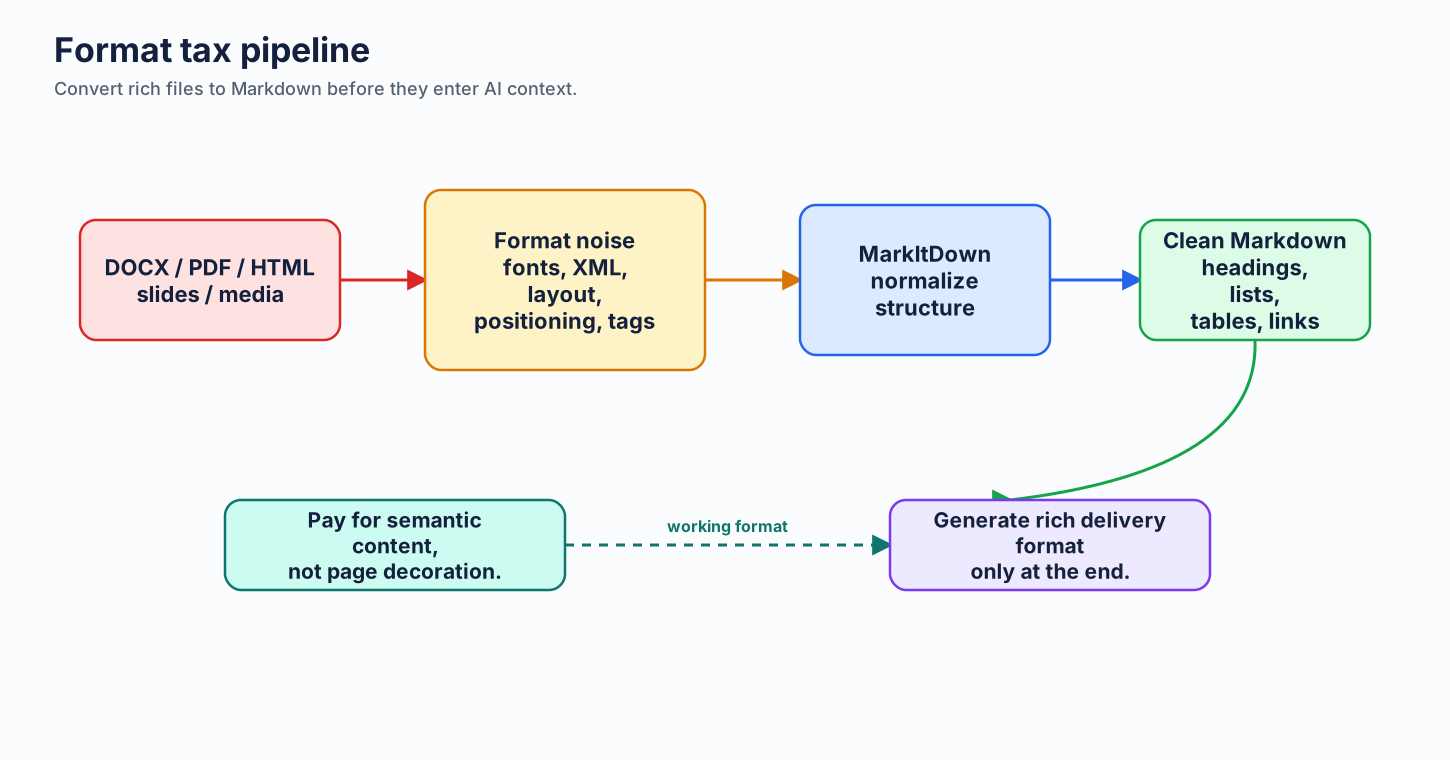
Marc Bara calls this the format tax in Your .docx Is Wasting 33% of Your AI Budget: Word, PDF, and HTML carry font data, XML, page-positioning metadata, layout artifacts, embedded objects, and tag soup that models must process but rarely need. The article cites a concrete example where a 10-page report extracted from PDF used roughly 12,400 tokens, while the same content as clean Markdown used about 8,350 tokens — a 33% reduction with the same information. HTML exports can be even worse because semantic content gets wrapped in long tags, classes, IDs, and layout scaffolding.
The rule: use Markdown as the working format for AI interaction, and treat Word/PDF/PowerPoint as delivery formats. Draft, review, summarize, chunk, and retrieve from Markdown. Generate .docx or .pdf at the end only when a client, regulator, or internal process needs that artifact.
Microsoft MarkItDown is the practical bridge. It is a Python tool for converting files and office documents to Markdown for LLM and text-analysis pipelines. It preserves useful structure such as headings, lists, tables, links, and extracted metadata, while avoiding high-fidelity visual layout noise. Current converters include PDF, Word, PowerPoint, Excel, images with EXIF/OCR support, audio with transcription support, HTML, CSV/JSON/XML, ZIP contents, YouTube URLs, EPUBs, and more.
Fast path:
pip install 'markitdown[all]'
markitdown report.docx -o report.md
markitdown deck.pptx -o deck.md
markitdown source.pdf > source.md
Use narrower extras when you control the workflow and want fewer dependencies:
Security note: MarkItDown reads files, streams, and URLs with the privileges of the current process. For untrusted inputs, validate paths and URLs first, and prefer the narrowest conversion API that fits the workflow.
2.3.4 Scope Context Intentionally — Conditional Over Always-On
Most context files are loaded on every interaction. That's a tax you pay even when the file isn't relevant — your React component questions don't need your database migration guidelines.
The fix: prefer conditional context over always-on context.
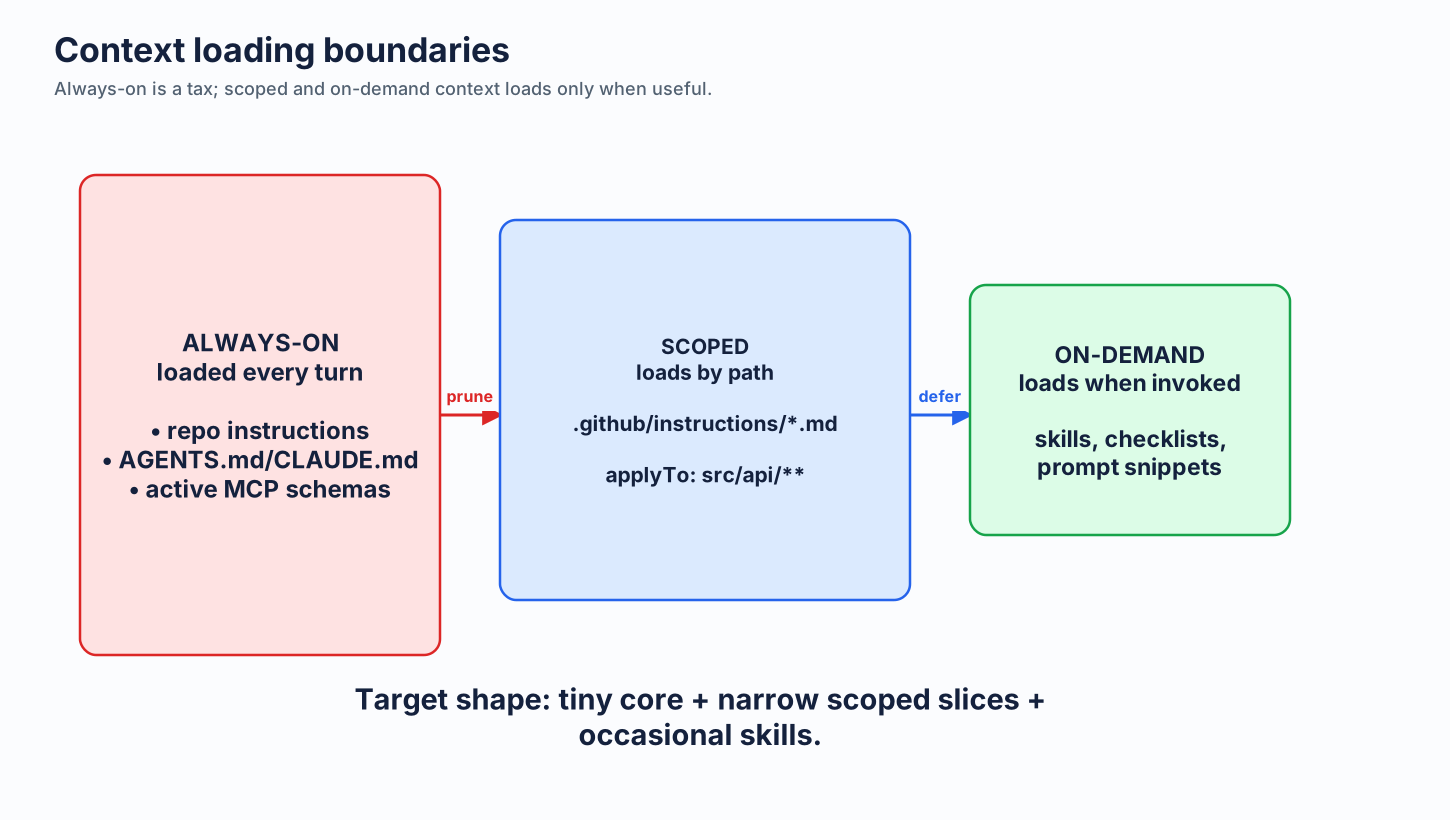
Use applyTo: paths in custom instructions
Custom instruction files in .github/instructions/*.instructions.md accept an applyTo frontmatter field that scopes the file to matching paths. Copilot only loads it when the conversation involves files matching the glob.
---
applyTo: "src/api/**/*.ts"
---
API conventions:
- Routes in src/api/routes/. Handlers thin, logic in services/.
- Validate with zod. Errors via Result<T,E>, never throw.
- All endpoints return { data, error } envelope.
Without applyTo, that's ~30 tokens loaded on every Copilot call across the whole repo. With it, the cost is paid only when you're actually editing API code.
Pattern: Split one big copilot-instructions.md into a small always-on core plus several scoped instruction files (api.instructions.md, ui.instructions.md, tests.instructions.md, migrations.instructions.md). Each carries its own applyTo glob. The total context surface stays large, but the per-interaction cost is small because only the relevant slice loads.
Leverage on-demand guidance and MCP tool discovery
Workflow-specific guidance should follow the same rule as MCP tools: keep it off the always-on prompt and bring it in only when the task needs it. A PR-review checklist, release template, or debugging playbook does not belong in copilot-instructions.md if you only use it occasionally.
Treat small prompt files, slash-command snippets, or saved checklists as the home for workflow-specific guidance. They stay out of every-day context until you invoke them.
The rule
- Always-on: the few rules that genuinely apply to every interaction (style, naming, "code only").
- Conditional (
applyTo): anything path-specific (per-language, per-module, per-layer). - On-demand note / MCP: anything workflow-specific that's invoked occasionally.
Most teams have it inverted — everything in always-on. Flipping the ratio cuts per-interaction context by 50-80% with zero loss of fidelity.
Large files on disk ≠ context cost. A common mistake: spending time compressing files that never actually enter the context window. In Copilot CLI, skills stored in
.copilot/skills/are on-demand — they load only when an agent explicitly requests one, and never touch theSystem/Toolsbaseline. Optimizing them improves per-spawn speed, not context headroom. The levers that move your context baseline are MCP tool definitions and always-on instruction files. See MCP & Tool Costs §2.7 for how to measure what's actually loaded.
2.3.5 Caching — Store and Reuse Context Within Prompts
The cheapest token is the one the platform doesn't have to re-process. Modern Copilot interactions cache stable portions of context (system prompt, instruction files, recently-loaded files) so they don't pay the full input-token cost on every turn.
In long sessions, this is often the biggest single cost lever. When most of your input is cache-hit input, effective input cost can drop dramatically (commonly cited as up to ~90% discount on cached input, depending on provider/model/surface billing rules).
You can lean into this. Two practical patterns:
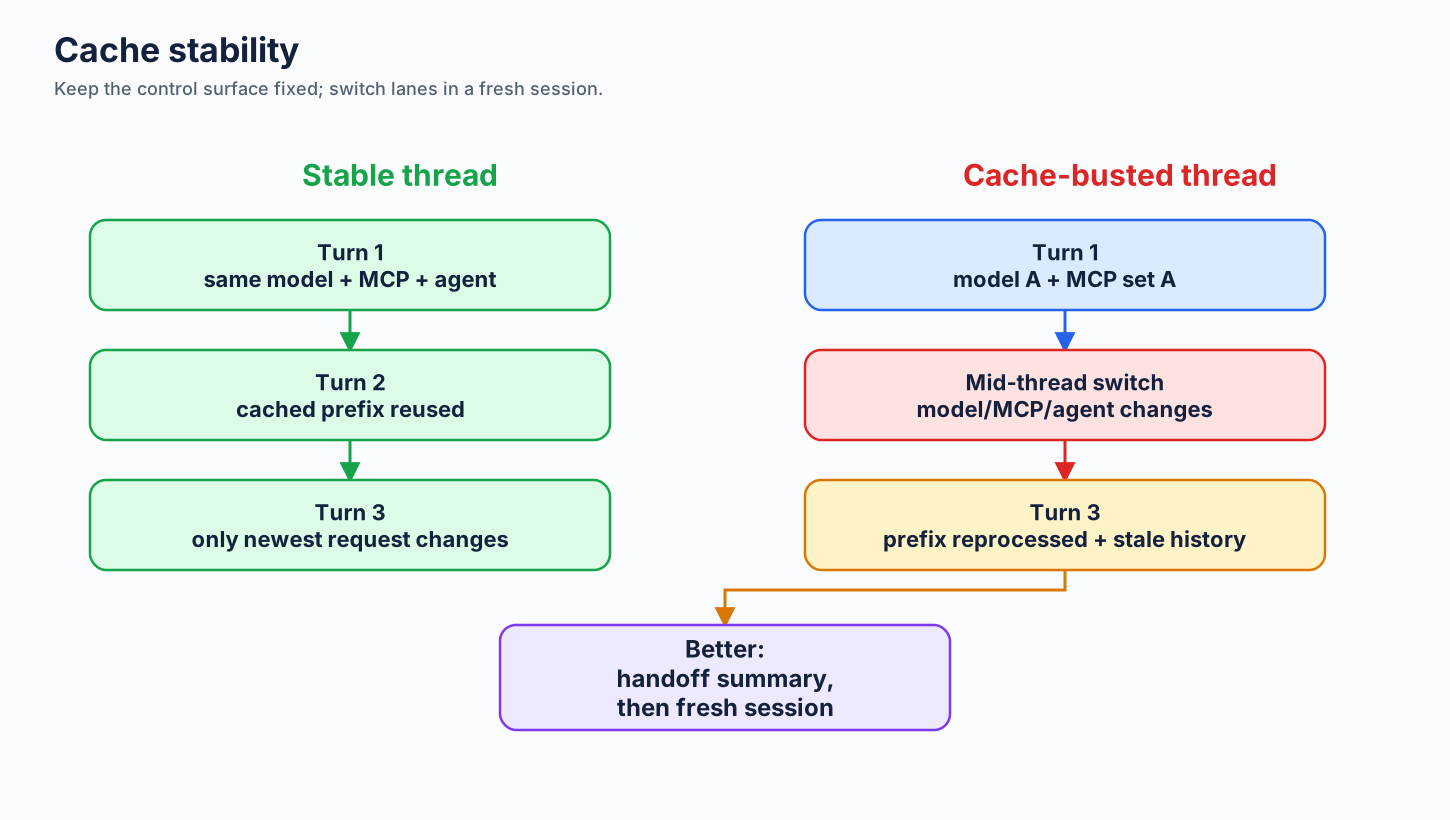
1. Stable instructions at the top, volatile work at the bottom. Cached context only works if the prefix of your conversation is stable. Don't reshuffle your copilot-instructions.md or rotate which files are open between every prompt — keep the stable layer stable, and let only the most recent message change.
2. Reuse named context via slash commands and saved snippets. When you frequently ask about the same domain, define it once and reference it. For example: keep a short customers-schema note or slash-command snippet, load it once for the session, then keep follow-up prompts anchored to that shared summary instead of re-pasting the schema every time.
3. Don't churn the cacheable prefix mid-session. The cached prefix is the front of every request — system prompt, tool/MCP definitions, and instruction files (the always-loaded System/Tools baseline; see MCP & Tool Costs §2.7). Changing any of it mid-conversation forces a full re-encode and forfeits the savings:
| Mid-session change | Effect on cache & context |
|---|---|
| Switch model or reasoning effort | Caches are typically per-model, and changing model configuration can discard the cached prefix. The carried history may then be billed again at standard input rates in the new lane. Pick both before work starts; see Model-switch rule. |
| Switch custom agent | Swaps the system prompt, tool set, and instructions — the prefix changes, so the cache is invalidated and the prior accumulated context becomes pollution under the new agent. |
| Toggle MCP servers, tools, or loaded skills | Changes the harness and its tool/instruction definitions in the prefix — cache invalidated, plus you add or remove always-loaded tokens on every later turn. |
| Churn large context | Attaching/detaching big files or pasting large blobs reshuffles context and undercuts prefix stability. Choose your files and context up front. |
The pattern: decide model, agent, and tool set before you start; if you genuinely need a different one, start a fresh session with only the relevant summary and files rather than mutating a long one. (Billing implementation varies by surface and plan, so treat this as risk control rather than guaranteed repricing math.)
Caching gains are real and dual-purpose: it's faster (cached prefixes skip re-encoding) and cheaper (most platforms bill cached input tokens at a fraction of the standard rate). Designing your context layout for cache stability is one of the lowest-effort wins available.
Cache-stable long thread

Turn 1     Turn 2     Turn 3     Turn 4
|          |          |          |
v          v          v          v
[same model + same reasoning effort + same skills/MCP set + same agent/profile]
[stable prompt prefix reused from cache          ]  -> lower effective input cost
[only newest user request changes               ]

Cache-busted long thread

Turn 1     Turn 2        Turn 3
|          |             |
v          v             v
[model A + MCP set A + agent A]
[cached prefix builds         ]
                  |
                  v
          switch model / reasoning effort / skills / MCP / agent
                  |
                  v
[large prefix invalidated or repriced] -> cache discount lost; start fresh instead
Protect the cache: avoid cache-busting changes mid-thread
In expensive long-running chats, treat cache stability as a hard constraint. The most common cache-busters are:
- Switching models mid-thread (for example, moving from one Claude/GPT tier to another)
- Changing reasoning effort mid-thread on a supported reasoning model
- Enabling or disabling MCP servers mid-thread (tool definitions sit near the top of context; changing them invalidates large prefixes)
- Loading or unloading skills mid-thread when they change the session's instructions or tools
- Switching agent/profile mode mid-thread (default agent ↔ custom agent, or one custom agent ↔ another)
Practical rule: keep this tuple fixed for the whole long thread:
If you need to change any item in that tuple, start a fresh conversation with a compact handoff summary instead of changing it in place.
Safe handoff pattern when a switch is required
- Summarize current thread in 5-10 bullets (decisions, constraints, open tasks).
- Start a new chat with the new model/agent/MCP setup.
- Paste only the summary + required files, not the entire old transcript.
This preserves cache efficiency in the original thread and prevents dragging stale context into a new cost lane.
2.3.6 Start Fresh Conversations
Conversation history accumulates. After 20+ messages, you might have 50K+ tokens of history sent with every new message.
When to start fresh:
- Topic change — new question, new file, new concern
- After getting the answer you needed
- When responses start getting slow (context window filling up)
- When you notice quality dropping (model confused by old context)
How to preserve continuity: Summarize key decisions in your new prompt. "Continuing from auth refactor — we chose JWT over sessions. Now implement refresh tokens."
2.3.7 Persistent Graphs — Replace Per-Session File Reads
The per-session codebase-read pattern is a hidden input cost: every new agent session starts from scratch, re-reading the same structural files to understand imports, call paths, and component layout. On large repos, orientation reads can burn thousands of tokens before the agent makes one useful edit.
Graphify attacks that cost differently from prompt compression. It parses the repo once with tree-sitter AST, writes a persistent graphify-out/graph.json, and lets agents query that graph instead of repeatedly reading source files for structure.
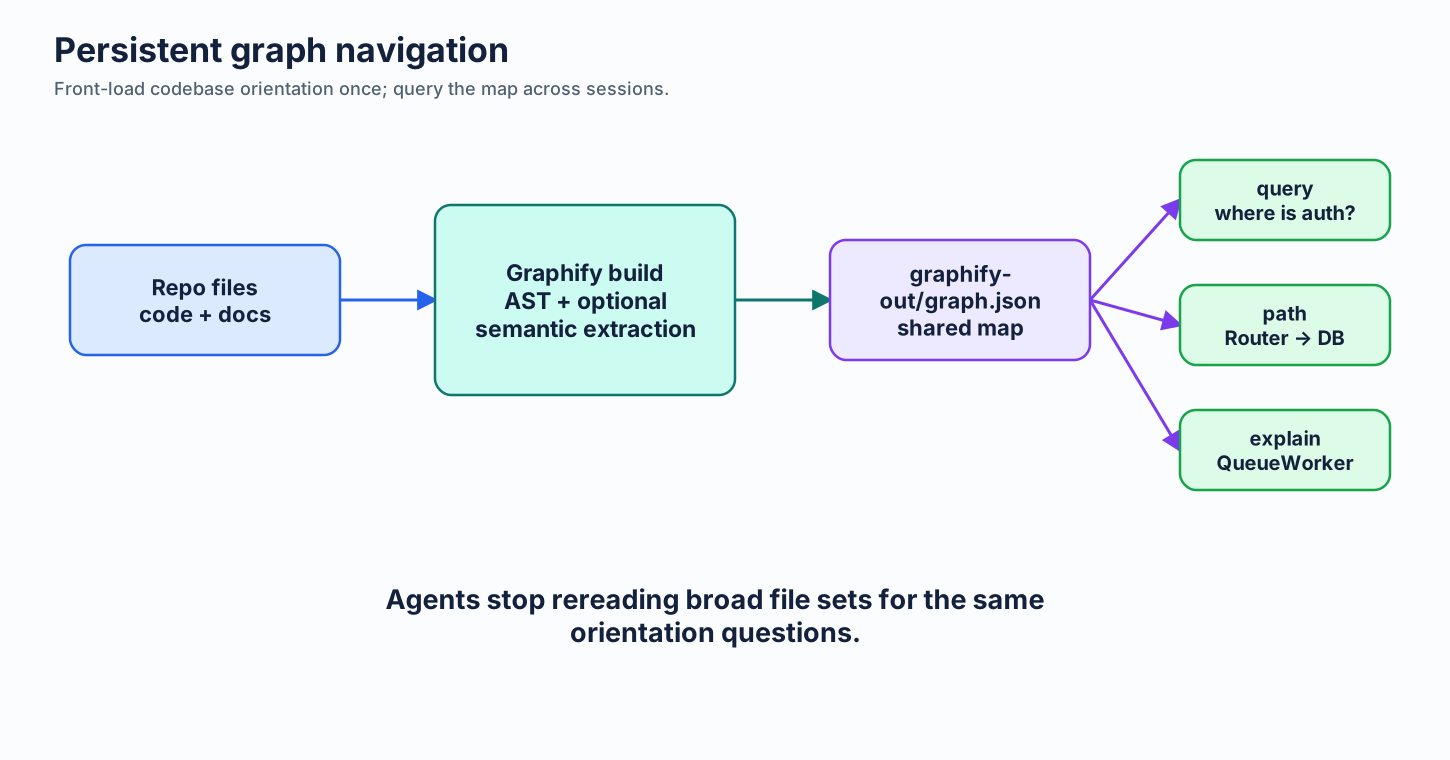
uv tool install graphifyy

# Build or update the graph in the repo
graphify .

# Query targeted structure instead of reading broad files
graphify query "where is auth middleware?"
graphify explain "UserService"
graphify path "Router" "Database"
Core outputs:
graphify-out/
├── graph.json       queryable graph for agents
├── graph.html       interactive visual explorer
└── GRAPH_REPORT.md  human-readable communities, god nodes, and suggested questions
When this helps most:
- large codebases where agents routinely start by reading 5-10 files for orientation
- repeated agent sessions over the same repo
- cross-file questions where a path/query answer is cheaper than broad file reads
- teams that can share the same graph build across developers or agents
When to skip: tiny repos where the agent reads two files and finishes. The one-time graph build is overhead if there is no repeated navigation cost to amortize.
Caveats:
- Code extraction is local and deterministic for the AST pass; optional semantic/deep extraction over docs, PDFs, images, or media may use a configured AI backend.
- The graph can go stale after large refactors. Rebuild it or use Graphify's update/watch/hook flows where appropriate.
GRAPH_REPORT.mdis generated output. Treat it as a map, not the source of truth.- Graphify complements RTK or snip. Graphify reduces repeated codebase-navigation input; shell-output filters compress verbose command results.
Next: Output Control →