Part 4: Practical Setup
4.1 Configuring GitHub Copilot for Token Efficiency
Step 1: Create copilot-instructions.md
Create .github/copilot-instructions.md in your repository root. This file is loaded on every Copilot interaction in the project.
Starter template (token-optimized):
Terse like caveman. Technical substance exact. Only fluff die.
Drop: articles, filler (just/really/basically), pleasantries, hedging.
Fragments OK. Short synonyms. Code unchanged.
Pattern: [thing] [action] [reason]. [next step].
ACTIVE EVERY RESPONSE. No revert after many turns. No filler drift.
Code/commits/PRs: normal. Off: "stop caveman" / "normal mode".
This is ~50 tokens. A natural-English equivalent would be 120+ tokens. You save 70+ tokens on every single interaction.
Step 2: Add Project-Specific Instructions (Compressed)
Add your project context in the same compressed style:
Stack: Node.js 20, TypeScript 5.4, PostgreSQL 16, Redis.
Test: Vitest. Lint: ESLint flat config.
Style: functional core, imperative shell. No classes.
Naming: camelCase vars/fns, PascalCase types, UPPER_SNAKE constants.
Errors: Result<T,E> pattern, no thrown exceptions in business logic.
vs. the natural-English version:
This project uses Node.js version 20 with TypeScript 5.4. We use PostgreSQL 16
as our primary database and Redis for caching. For testing, we use Vitest, and
for linting, we use ESLint with the new flat configuration format.

We follow a functional core, imperative shell architecture. Please don't use
classes. For variable and function naming, use camelCase. Types should be in
PascalCase, and constants should be in UPPER_SNAKE_CASE.

For error handling, we use the Result<T,E> pattern. Don't throw exceptions in
business logic code.
Both convey identical information. The compressed version is ~40 tokens. The verbose version is ~110 tokens. 64% savings, applied to every interaction.
Step 3: Choose Your Default Mode
In VS Code, Copilot Chat offers mode selection. Default strategy:
| Task Type | Mode | Why |
|---|---|---|
| Quick questions | Ask | Single LLM call, no tool overhead |
| Code explanations | Ask | No file modification needed |
| Bug diagnosis | Ask (usually) | You provide the context |
| Single-file changes | Edit | Targeted, minimal overhead |
| Multi-file refactors | Agent | Needs to read/write across files |
| New feature implementation | Agent | Multi-step creation |
| Issue-to-PR automation | Coding Agent | Full autonomous workflow |
Step 4: Select Models Strategically
GitHub Copilot pricing depends on model choice and billing mode. Pick the model whose cost matches the level of effort the task actually needs. For the pricing details and billing timeline, see Model Selection & Pricing.
| Model Tier | Relative Token Cost | Use For |
|---|---|---|
| Lightweight (GPT-4.1 mini, Haiku) | Lowest | Autocomplete, simple syntax, lookup-style questions |
| Standard (GPT-4.1, Sonnet) | Mid | Most coding tasks — implementation, refactors, fixes |
| High-effort (Claude Opus, o-series reasoning) | Highest | Architecture, deep reasoning, novel problem decomposition |
| Auto | Low by default | Default: Copilot chooses from the supported Auto pool and applies the paid-plan discount where eligible |
Default to Auto. Auto is the best general-purpose baseline because it reduces picker fatigue and, on eligible paid-plan usage, applies the discount documented by GitHub. Treat Auto as the default lane, not as automatic escalation to every high-effort model. If you need a premium high-effort model, pin it manually. See Model Selection & Pricing.
Never burn a high-effort model on a "what's the syntax for X" question — you pay the higher token rate for an answer the cheapest model would have given you correctly.
Cache-protection rule for long sessions
After you choose the lane for a long thread, keep it stable:
Do not change those controls in the middle of an expensive conversation unless required. Model, reasoning-effort, skill, or harness changes can invalidate the cached prefix and make its context bill again at standard input rates.
If a switch is required, do this instead:
- Capture a short handoff summary (decisions, constraints, next actions).
- Start a new chat with the new lane.
- Paste only the summary and required files.
Step 5: Mix Models by Task (Model Routing)
One useful cost lever: use different models for different subtasks within the same workflow. The detailed pricing context, historical multiplier references, plan availability, and official GitHub Docs links now live in Model Selection & Pricing. Keep this section focused on the practical routing habit.
The Model Mixing Strategy
Match the model to the cognitive demand of the task:
| Task Type | Recommended Model | Relative Cost | Why |
|---|---|---|---|
| "What does this function do?" | GPT-4.1 / GPT-5 mini | Included | Knowledge retrieval, no reasoning needed |
| "What's the syntax for X?" | GPT-4.1 / GPT-5 mini | Included | Memorized knowledge |
| Quick explanations, summaries | Claude Haiku 4.5 | 0.33x | Fast, cheap, good enough |
| Code review, linting suggestions | Claude Haiku 4.5 | 0.33x | Pattern matching, not deep reasoning |
| Implement a feature, fix a bug | Claude Sonnet 4.5 | 1x | SWE-bench suggests this is the practical default |
| Multi-file refactors | Claude Sonnet 4.5 | 1x | Matches Opus on real coding tasks |
| Architecture decisions, system design | Claude Opus 4.6 | 3x | Deep reasoning justifies the cost |
| Complex multi-step planning from spec | Claude Opus 4.6 | 3x | Novel problem decomposition |
| Security audits, threat modeling | Claude Opus 4.6 | 3x | Nuance and thoroughness matter |
Real-World Savings Example
Typical daily workflow (30 interactions), expressed in standard-tier-equivalent token cost:
| Without mixing (all Sonnet) | With mixing | Savings |
|---|---|---|
| 30 × 1x = 30 cost units | 10 × included + 8 × 0.33x + 10 × 1x + 2 × 3x = 18.6 cost units | 38% |
If you were using Opus for everything: 30 × 3x = 90 cost units. Mixing drops that to 18.6 — a 79% reduction in relative model cost.
Auto Model Selection Should Be Your Default
Copilot's Auto mode chooses from the supported Auto-selection pool based on real-time system health and model performance. On paid plans, GitHub documents a 10% discount for eligible Auto usage in Copilot Chat. Treat Auto as the default low-friction lane; higher-cost premium models still need to be pinned manually.
Default to Auto. Override only when needed. This is a high-leverage default for teams because it keeps the day-to-day default in the lower-cost lane. Use Auto unless you have a specific reason to pin a model — for example, you know the task is trivial (force the cheapest tier) or you know it needs deep reasoning (pin to a premium model manually). For the exact tradeoffs, see Model Selection & Pricing.
The Anti-Pattern: High-Effort Models for Everything
A costly habit: defaulting to Opus or another high-effort model for every interaction. People do this because "better model = better results." For most day-to-day coding tasks, the extra model cost is hard to justify.
Reserve high-effort models for their actual strengths: novel reasoning, architectural judgment, and tasks where a 1-2% quality difference justifies a 3-5x cost increase.
Reasoning Effort: Another Lever
Beyond model selection, a second cost dial exists on reasoning-capable models: thinking effort (or reasoning effort). This controls how many tokens the model spends thinking before responding — affecting text, tool calls, and extended thinking all at once.
| Effort Level | Behavior | Anthropic's Recommended Use |
|---|---|---|
max |
No constraints on token spending | Deepest possible reasoning, thorough analysis |
high (default) |
Always thinks deeply | Complex reasoning, difficult coding, agentic tasks |
medium |
Moderate token savings, may skip thinking | Anthropic's recommended default for Sonnet 4.6 — agentic coding, tool-heavy workflows, code generation |
low |
Significant token savings, skips thinking for simple tasks | High-volume, latency-sensitive, chat, simple classification |
Sources: Anthropic Effort Parameter Docs, April 2026; VS Code Language Models Docs, April 2026; GitHub Copilot CLI programmatic reference, April 2026.
Key facts from Anthropic's documentation:
- Effort affects everything, not just thinking tokens. Lower effort = shorter text responses, fewer tool calls, less preamble before acting. This is a broader lever than
budget_tokens. - Anthropic recommends
mediumas the default for Sonnet 4.6, nothigh. Their docs explicitly say medium is the "best balance of speed, cost, and performance for most applications" including agentic coding. - Exposed in Copilot on many reasoning-capable model families. In VS Code, thinking effort appears for reasoning models such as Claude Sonnet/Opus reasoning variants and GPT reasoning models when supported. Non-reasoning models such as GPT-4.1 and GPT-4o do not show the control. In Copilot CLI, some models also support a
reasoning_effortsetting in config. - Works without extended thinking enabled. You don't need to turn on a separate visible thinking mode to benefit — effort controls total token spend regardless.
- No published benchmarks. Anthropic provides qualitative guidance (the table above) but has not published specific numbers on quality-vs-effort tradeoffs. This is vendor-recommended, not independently benchmarked.
Copilot does expose this on many reasoning-capable models. In VS Code, select a reasoning model in the model picker, open its thinking-effort submenu, and choose the level. This applies to reasoning-oriented model families, including Claude Sonnet/Opus reasoning models and GPT reasoning models when the selected model supports it; non-reasoning models such as GPT-4.1 and GPT-4o do not show the submenu. In Copilot CLI, some models also allow a reasoning_effort setting in config, with GitHub's docs showing gpt-5.3-codex as an example. The same lever is available directly in the Claude API and related tools. The combination of Sonnet at medium effort vs. Opus at high effort could still represent a 3-5x+ total cost difference for equivalent coding tasks.
Step 6: Retune Instructions for the Model You Actually Use
When you change models, do not assume the old prompt stack is still optimal. Provider prompting guides are version-specific and frequently explain behavior changes: verbosity, tool eagerness, structure preferences, reasoning effort, and stop conditions.
Fast workflow:
Paste official guide URL into Copilot.
Name target model and files.
Ask Copilot to adapt prompts/instructions while preserving behavior.
Review diff; keep only concrete changes that reduce wrong turns.
Example:
Target model: Claude Sonnet 4.6.
Guide: https://platform.claude.com/docs/en/docs/build-with-claude/prompt-engineering/claude-4-best-practices
Files: .github/copilot-instructions.md, .github/instructions/*.instructions.md
Adapt instructions for this model. Preserve repo behavior. Reduce rework. Keep terse.
See Workflow Optimization §2.5.5 for provider guide URLs and side-by-side Sonnet, GPT-5.5, and Gemini examples.
Step 7: Add Org Guardrails Outside the Prompt
Do not try to solve governance with prompt text alone. Prompt files shape behavior. Billing controls live elsewhere.
If you are guiding an organization or enterprise rollout, stop here and read Enterprise Governance. That chapter owns the admin guidance: AI-credit budgets, per-user tightening, model-access policy, org instructions, and separate-organization tradeoffs.
Use this page for practitioner setup. Use the enterprise chapter for customer governance decisions.
Step 8: Convert Non-Text Inputs Before AI Work
When a workflow starts from .docx, .pdf, .pptx, .xlsx, HTML exports, images, audio, video, or ZIP archives, add a conversion step before the content reaches Copilot or a RAG pipeline. Rich formats carry layout and metadata that inflate input tokens without improving the model's understanding.
Marc Bara's format-tax writeup gives the operating principle: Markdown should be the working format for AI, while Word/PDF remain output formats when a human process requires them. The article cites a 10-page PDF example dropping from roughly 12,400 tokens to 8,350 after clean Markdown conversion — about 33% less input for the same content.
Microsoft MarkItDown is the default tool to try first. It converts PDF, Word, PowerPoint, Excel, images, audio, HTML, CSV/JSON/XML, ZIP contents, YouTube URLs, EPUBs, and more into Markdown for LLM and text-analysis workflows.
pip install 'markitdown[all]'

markitdown report.docx -o report.md
markitdown slides.pptx -o slides.md
markitdown spreadsheet.xlsx -o spreadsheet.md
markitdown source.pdf > source.md
For production pipelines, install only the needed extras when possible:
Then send the .md file to the model, chunk/index the .md file for retrieval, and regenerate .docx or .pdf only at the final delivery step. For untrusted uploads, validate paths and URLs first; MarkItDown performs I/O with the privileges of the running process.
4.2 Keep Reusable Guidance Outside Always-On Context
This repo no longer ships installable workflow packs. Keep the same habit, though: put occasional workflow guidance outside the always-on prompt and pull it in only when the task needs it.
Good candidates:
- PR-review checklists
- release or rollback templates
- debugging playbooks
- migration notes for one subsystem
Store them wherever your team already keeps reusable prompts or operating notes. The token rule stays the same: if a rule is not needed on most interactions, do not keep paying for it on every interaction.
Optional for CLI-heavy users: CodeAct
If most of your long-running work happens in Copilot CLI, optional external plugin copilot-codeact-plugin is worth evaluating. It is not part of this repo and not a general Copilot Chat feature. The value proposition is workflow shape: collapse many grep / view / bash / MCP hops into one sandboxed execution so the full context and tool catalog replay fewer times. Use it for CLI-heavy sessions; skip it if your work is mostly IDE chat/edit or if you do not want an external plugin in the path.
MCPs vs. Skills: Eager vs. Lazy Context Loading
MCPs (Model Context Protocol servers) inject their full tool schema into context on every interaction — regardless of whether those tools are used. A server with 20 tools can add thousands of tokens to every request in your session.
Skills behave differently: only the title and description load upfront. The full skill content pulls on demand, only when the skill is actually relevant to the current task.
| Mechanism | What loads per turn | When full content loads |
|---|---|---|
| MCP | Complete tool schema (always) | N/A — always present |
| Skill | Title + description only | On demand, when invoked |
Rule: Use MCPs for capabilities needed on most interactions. Use skills for occasional capabilities — you pay the full schema cost per turn with MCPs, but only per invocation with skills. If a tool is used in 1 in 10 conversations, a skill is roughly 10× cheaper in context overhead.
Optional: minimal-context-tools
minimal-context-tools packages this idea as skills for common low-token CLI patterns: fd for file discovery, rg for targeted text search, jq/yq for structured data, ast-grep for syntax-aware code queries, and tokei for code statistics.
Use it as a behavior layer, not as another always-on MCP server. The point is to make the agent ask narrower questions before any output filter runs. It pairs well with RTK or snip: skills reduce how much the agent requests; RTK/snip reduce how much comes back.
4.3 GitHub Coding Agent Considerations
The Coding Agent runs autonomous sessions that can last minutes to hours. Token savings compound over those long sessions.
4.3.1 Compress copilot-instructions.md
The agent reads this file. A compressed instructions file saves tokens on every internal planning step — and the agent takes many steps per session.
4.3.2 Use copilot-setup-steps.yml
Pre-install dependencies deterministically:
# .github/copilot-setup-steps.yml
steps:
  - name: Install dependencies
    run: npm ci
  - name: Build
    run: npm run build
Without this, the agent discovers and installs dependencies through trial and error — each attempt costs LLM calls and tokens. Savings: 10-30% of total session tokens.
4.3.3 Write Precise Issue Descriptions
Vague issues cause the agent to explore the codebase extensively (reading many files = many tokens) and potentially misunderstand requirements (rework = more tokens).
Vague issue:
Precise issue:
Bug: login fails when email contains '+' character.
File: src/auth/login.ts, validateEmail() on L42.
Fix: URL-encode the email before passing to the OAuth provider.
Test: add case for "user+tag@example.com" in login.test.ts.
Savings: 20-50% of total session tokens by reducing exploration and rework.
4.3.4 Terse PR Comments and Commit Messages
The agent reads PR review comments and git history for context. Every verbose commit message or review comment costs tokens when the agent ingests them. Keep commit messages and review comments terse.
4.3.5 Custom Agent Profiles
Create focused instructions for different task types instead of one giant instruction file:
# For test-writing tasks
Stack: Vitest + Testing Library. AAA pattern.
Mock: external services only. No impl mocking.
Coverage: branch coverage ≥80%.
Focused agents carry less instruction overhead than a general-purpose instruction set. They also give you a stable control surface: the same task profile can declare the tools it is allowed to use, the instructions it carries, and, where your Copilot surface supports it, the model it should use. For repeat coding workflows, prefer a focused custom agent over the default agent when you care about predictable cost. The default agent inherits more of the current environment: active tools, extension-provided surfaces, and whatever model is currently selected.
Keep the tool list narrow. This repo's agents/token-saver.agent.md is the pattern: built-in bash, edit, and view; no duplicate filesystem MCP; terse output rules; explicit tool minimization.
4.3.6 Compress Shell Command Output with RTK
The Coding Agent runs many shell commands per session — git diff, test runs, grep, ls. Each command's raw output flows back as input tokens on the next agent step. A large failing test suite or verbose git diff can return tens of thousands of tokens.
RTK (Rust Token Killer) is a CLI proxy that filters those outputs before they reach the agent. It runs the original command, removes noise (passing tests, unchanged diff lines, build artifacts), and returns a compressed result. The agent behavior is unchanged; it sees smaller, signal-focused output.
Setup for VS Code Copilot — per-repo:
brew install rtk   # or: curl -fsSL https://raw.githubusercontent.com/rtk-ai/rtk/refs/heads/master/install.sh | sh

cd your-repo
rtk init --copilot
# Restart VS Code
RTK installs a PreToolUse hook into the current repository. Newer RTK builds also document a global Copilot hook path; validate that path on your Copilot surface before making it a team default. Once active, the hook is transparent: your terminal is unchanged; only the agent's Bash tool calls are intercepted.
On Windows, validate RTK before recommending it to a team. The hook path can be more fragile across PowerShell, Git Bash, WSL, and VS Code agent execution. If RTK adds setup friction or command failures, skip it and focus first on clean profiles, fewer MCP servers, precise prompts, and shorter command output.
Commands with verbose output (test failures, large diffs) see the biggest reductions. Short-output commands see smaller gains. Actual savings depend on your project's output volume.
Combine with copilot-setup-steps.yml (§4.3.2) and precise issue descriptions (§4.3.3) for maximum session efficiency. Full setup, command list, and other AI tool support: MCP & Tool Costs §2.7.7.
4.3.7 Compress Shell Command Output with snip
snip is the closest practical alternative to RTK for Copilot-oriented shell-output compression. It runs commands normally, filters the output through declarative YAML pipelines, and can track local savings with snip gain.
Install:
brew install edouard-claude/tap/snip
# or:
go install github.com/edouard-claude/snip/cmd/snip@latest
Set up Copilot CLI:
Use snip when you want project-specific or team-maintained filters without recompiling a tool. A filter can match a command/subcommand and apply actions like head, tail, keep_lines, remove_lines, json_extract, regex_extract, group_by, dedup, or aggregate.
Example filter shape:
name: "my-test-summary"
match:
  command: "my-test-runner"
pipeline:
  - action: "keep_lines"
    pattern: "FAIL|ERROR|expected|actual"
  - action: "head"
    n: 80
Team rollout: start with one repo and one shell surface. Validate that failed tests, diffs, and build errors still preserve enough detail for the agent to fix the problem. Do not enable RTK and snip on the same command path by default; choose one filter layer and measure.
4.3.8 Build a Persistent Knowledge Graph with Graphify
RTK and snip compress what shell commands return. Graphify addresses a different cost: tokens spent reading project files to understand structure before the agent can act.
Install once:
Build or update the graph in the repo:
Then query targeted structure:
graphify query "where is error handling for the API layer?"
graphify path "AuthService" "Database"
graphify explain "QueueWorker"
The graph lives in graphify-out/graph.json. The human-readable map is graphify-out/GRAPH_REPORT.md; the visual explorer is graphify-out/graph.html.
Biggest gains: Coding Agent and agent-mode sessions on large repos where the first several steps are file reads for orientation. Graphify front-loads that structural scan once and amortizes it across later sessions.
Team choice: decide whether to commit graphify-out/graph.json and GRAPH_REPORT.md so agents share the same map, or .gitignore graphify-out/ and let each developer build locally. Do not commit graphs that expose sensitive source relationships if your repo policy treats them as restricted metadata.
Combine with:
copilot-setup-steps.yml(§4.3.2) so the agent environment is deterministic before graph queries matter- precise issue descriptions (§4.3.3) so the agent queries the right subgraph, not the whole repo map
- fresh execution sessions (Outcome per Token) so the graph supplements a short plan instead of a long transcript
Note: code parsing is local for the AST pass. Optional semantic/deep extraction over docs, PDFs, images, or media may use a configured AI backend. Review that boundary before enabling extras on proprietary codebases.
4.3.9 Use a Session Harness Checklist
A "harness" is not a separate install here. It is the stable set of controls around an agent session:
model + reasoning effort + mode + agent/profile + loaded skills + active MCP/tools + output filter + repo instructions
Before a long agent run, set those once and keep them stable. Changing the model, reasoning effort, loaded skills, or other harness controls mid-session can invalidate cached prefixes and make the agent carry stale context under a new setup.
Use this checklist:
- Pick the mode: Ask/Edit/Agent/Coding Agent.
- Pick the model lane or Auto and reasoning effort.
- Disable unused MCP servers, skills, and extension-provided tools.
- Pick one command-output filter if needed: RTK or snip.
- Use Graphify if repeated codebase orientation dominates.
- Start a fresh session if you need to change the model, effort, skill, or harness.
4.4 Building the Habit
Start Small
- Week 1: Add compressed
copilot-instructions.mdto your main project. Use Ask Mode for simple questions - Week 2: Practice caveman-lite in prompts. Drop filler words, be precise
- Week 3: Graduate to caveman-full. Drop articles, use fragments
- Week 4: Add "code only" to code generation prompts. Save reusable terse templates outside always-on context
Monthly Maintenance
- Review your
copilot-instructions.md— has it grown? Compress it back down - Check if any memory files have gotten verbose — compress them back down
- Audit which files are habitually open in your editor — close ones you're not working on (open tabs auto-feed context)
- Audit VS Code profiles and extensions — disable extensions that inject AI skills, agents, MCP servers, or tools unless the current repo needs them
- (Business/Enterprise) Review repository / org Content Exclusion settings for new sensitive paths
- Check your model usage — are you pinning high-effort models for tasks Auto would route to a cheaper tier?
- In Copilot CLI, watch the bottom-right AIC counter. Divide by 100 for the approximate dollar value, then ask whether the output saved more time or cost than it consumed. If spend is high for weak output, treat that as feedback on prompt scope, context size, tool count, or model choice
- Review budgets, user-level caps, and model policies before expanding premium access further
- When default model changes, retune prompts/instructions against that provider's current prompting guide
- Check token usage by user/team — are agents and power users driving outsized consumption? See Enterprise Governance
When to Adjust
| Signal | Action |
|---|---|
| Getting wrong results | Back off one compression level |
| Re-explaining frequently | Instructions may be too terse — add one clarifying line |
| Hitting rate limits | Apply more techniques from the matrix |
| New team member confused | Add full-English comments in code, keep instructions compressed |
| Long agent sessions failing | Check issue description precision, add copilot-setup-steps.yml |
4.5 Configuring Agent Mode for Efficiency
4.5.1 Agent Mode vs. Ask Mode vs. Edit Mode
Each mode has a fundamentally different token cost profile:
| Mode | LLM Calls per Action | Tool Use | Context Loaded | Best For |
|---|---|---|---|---|
| Ask | 1 | None | Conversation + instructions | Questions, explanations |
| Edit | 1-2 | File read/write | Target file + instructions | Single-file changes |
| Agent | 5-25 | Full toolset | Everything + tool schemas | Multi-step, multi-file tasks |
The cost multiplier: Agent mode costs 5-25x more than Ask mode for the same prompt. A simple question in Agent mode triggers file reads, tool evaluations, and multi-step reasoning — all unnecessary for "what does this function do?"
4.5.2 The Agent Mode Internal Loop
Understanding the loop helps you minimize steps:
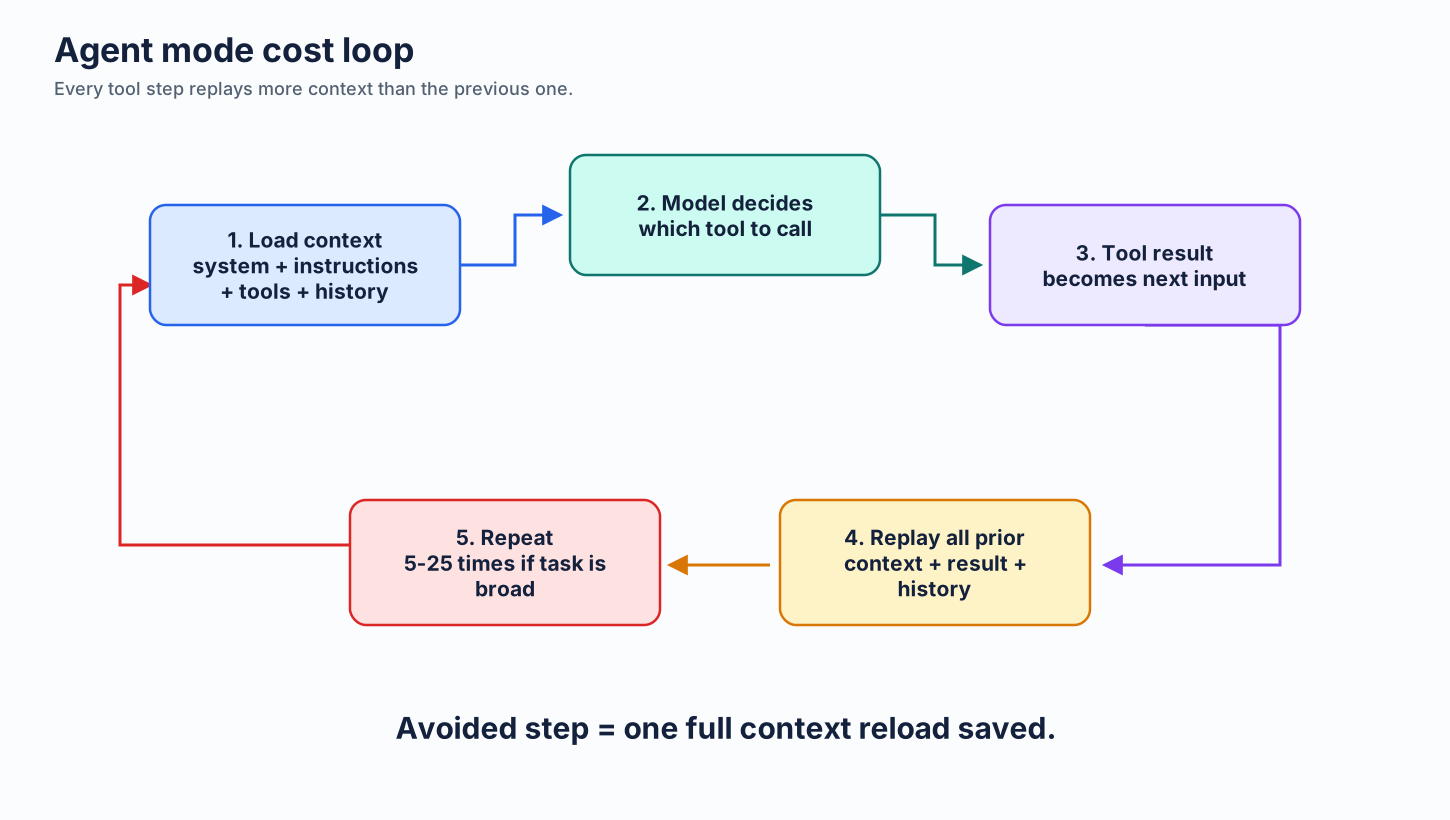
Key insight: Context grows with every step. Step 15 carries all the context from steps 1-14 plus the original prompt. This is why long agent sessions get expensive fast.
4.5.3 Minimizing Agent Steps
Every step avoided saves one full context reload. Techniques:
Precise prompts with acceptance criteria:
# Bad — agent will explore, read files, guess requirements
"Fix the user registration"

# Good — agent knows exactly what to do
"File: src/auth/register.ts L42.
 Bug: email validation rejects valid '+' chars.
 Fix: use RFC 5322 regex.
 Test: add 'user+tag@example.com' case in register.test.ts.
 Done when: test passes, no other tests break."
The precise version might complete in 3-5 steps. The vague one: 10-20 steps of exploration.
Plan files for complex tasks:
Create a plan before invoking agent mode:
# plan.md
1. Add `validateEmail()` to src/utils/validation.ts
2. Import and use in src/auth/register.ts L42
3. Add test cases in tests/auth/register.test.ts
4. Run `npm test` — expect all pass
Then prompt: "Execute plan.md." The agent follows the plan instead of discovering the path itself. Fewer exploration steps = fewer tokens.
Use CLI composition instead of agentic tool loops for deterministic operations:
Multi-step browser or data operations dispatched through an agent trigger one LLM call per step — and each step reloads the full accumulated context. A single generated CLI command executes the same work in one shell invocation:
# Browser automation — one LLM call generates this; one shell call runs it
playwright goto https://example.com && wait 1000 && click '#submit-btn' && screenshot out.png

# Chained with filters — no agent loop needed
gh issue list --json number,title,labels | jq '.[] | select(.title | test("bug"; "i"))'

# Piped data transforms
cat logs/app.log | grep ERROR | awk '{print $1, $5}' | sort | uniq -c | sort -rn | head -20
CLI commands are composable, inspectable, re-runnable, and version-controllable. Changing a selector, a filter, or a URL means editing one line of text — not re-prompting an agent through another multi-step loop. Reserve agentic tool use for tasks that genuinely require dynamic decision-making; offload deterministic sequences to the shell.
4.5.4 VS Code Settings for Token Efficiency
Relevant settings that affect agent token usage:
{
  // Maximum number of requests the agent can make (default: 25)
  "chat.agent.maxRequests": 10,

  // Use auto model selection — cheaper models for simple sub-tasks
  "github.copilot.chat.agent.model": "auto"
}
maxRequests caps how many tool-call requests the agent can make. Lower = fewer tokens, but the agent might not finish complex tasks. Start at 10-15, increase only when needed.
For repeat workflows, pair this with a custom agent profile and a clean VS Code profile. Disable extensions that inject skills, agents, MCP servers, or tool surfaces you do not need for coding. The most predictable setup is boring: one focused agent, one intended model, and only the tools required for the repo.
4.5.5 Custom Instructions for Agent Efficiency
Add to .github/copilot-instructions.md:
Minimize tool calls. Read files only when necessary.
Batch related changes. Don't read-modify-read-modify when read-modify-modify works.
Prefer grep_search over sequential read_file for discovery.
These directives reduce unnecessary tool calls. Each skipped tool call saves 100-2,000+ tokens of tool input/output.
4.5.6 Decision Framework: When to Use Each Mode
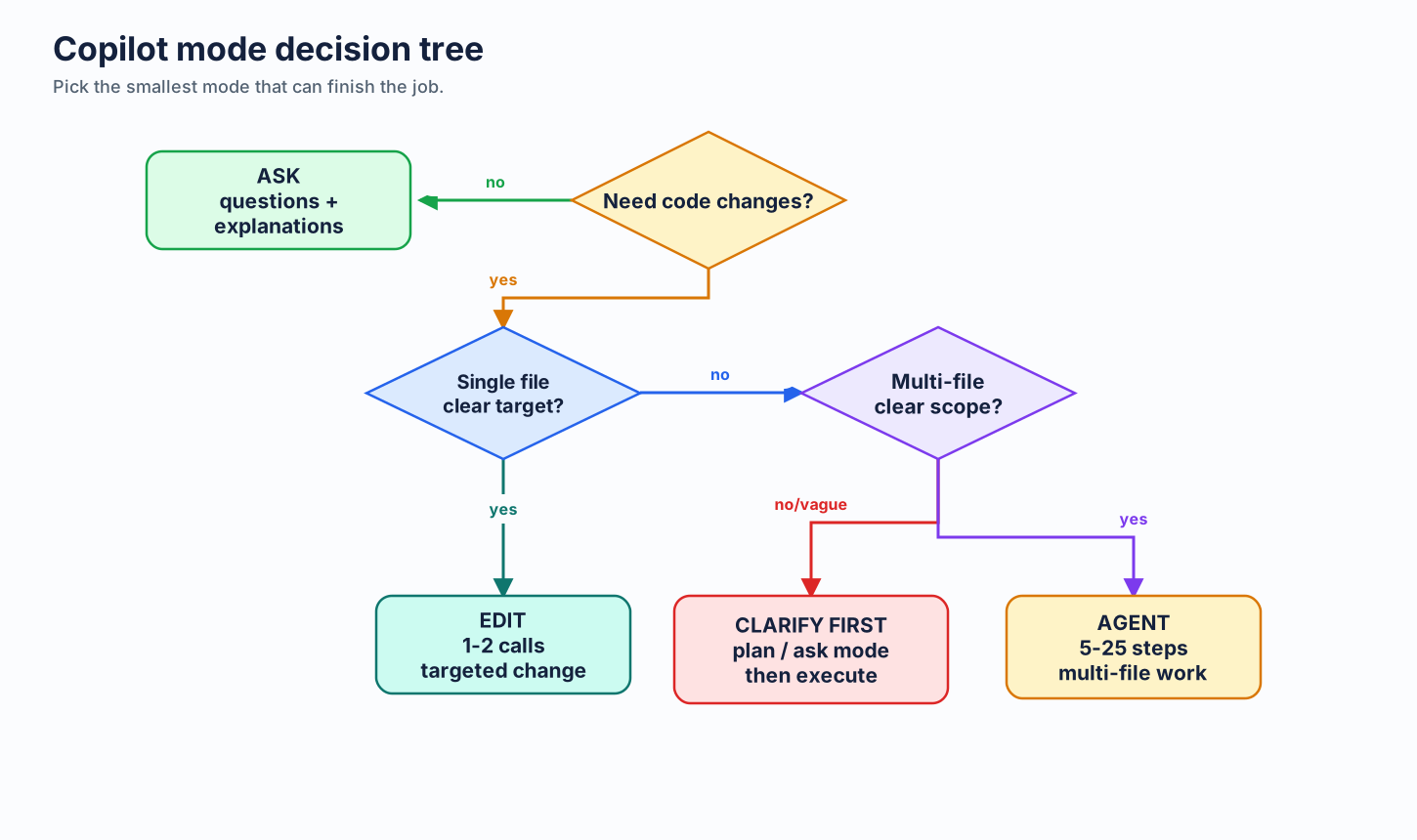
A costly pattern: Using Agent Mode for a vague prompt, watching it explore for 20 steps, then realizing it misunderstood and starting over. That can double token use without improving the result.
4.6 Admin Guardrails Live Elsewhere
This page is for practitioner setup. If you are making customer or enterprise rollout decisions, use Enterprise Governance instead.
That chapter owns:
- user-level AI-credit budgets
- heavy-usage monitoring
- model-access policy
- org-level custom instructions
- June 1 cutover guidance