2.1 Prompt Compression — Say the Same Thing in Fewer Tokens
2.1.1 Caveman-Speak
The single most effective token optimization technique. Drop the linguistic scaffolding that adds tokens without adding information.
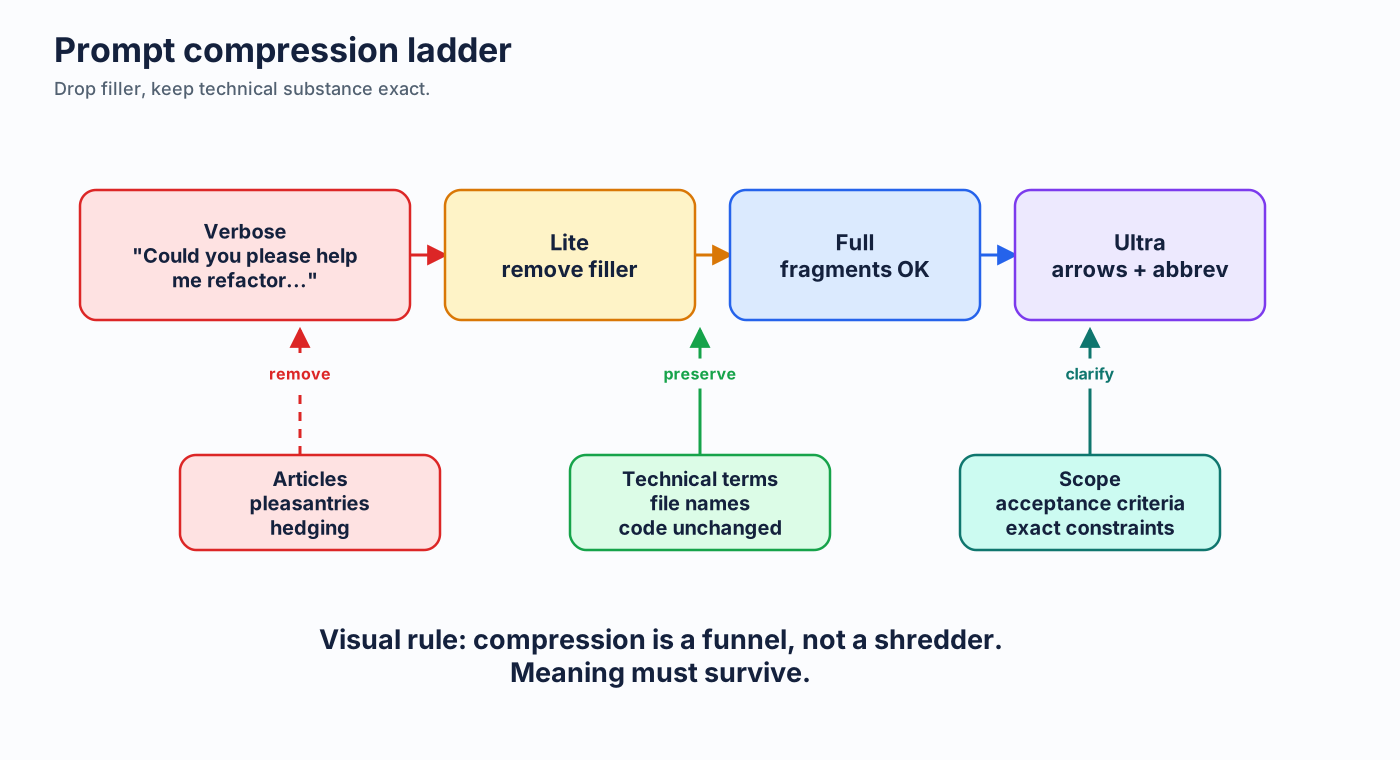
What to drop:
- Articles: a, an, the
- Filler words: just, really, basically, actually, simply
- Pleasantries: "Sure, I'd be happy to help!", "Of course!", "Certainly!"
- Hedging: "I think maybe", "it's probably", "you might want to consider"
What to keep:
- All technical terms — exact
- Code — unchanged
- Specificity — more precise, not less
Before and after:
| Style | Prompt | ~Input Tokens |
|---|---|---|
| Verbose | "Hey, could you please help me refactor this function? I think it might have some issues with how it handles the authentication, and I'd really like it to be more efficient. Thanks!" | ~40 |
| Caveman | "Refactor function. Fix auth handling. Make efficient." | ~10 |
That's 75% savings on this specific, heavily-padded prompt — and the model understands both equally well. Real developer prompts that are already relatively concise typically yield 30–50% input token savings with full caveman.
The pattern: [thing] [action] [reason]. [next step].
More examples:
| Verbose (~input tokens) | Caveman (~input tokens) | Input Savings |
|---|---|---|
| "Can you explain what this error message means and how I should fix it?" (~16) | "Explain error. How fix." (~5) | ~69% |
| "I'd like you to add comprehensive error handling to this API endpoint, including validation of the request body." (~22) | "Add error handling to endpoint. Validate request body." (~10) | ~55% |
| "Could you please review this pull request and let me know if there are any issues?" (~17) | "Review PR. Flag issues." (~5) | ~71% |
Note: these examples all start from verbose, pleasantry-heavy prompts. Real developer prompts that are already lean will see smaller savings — typically 20–40% input reduction.
2.1.2 Intensity Levels
Not every situation calls for the same compression level. This guide uses three English intensities:
Lite — Professional but tight
Remove filler and hedging. Keep articles and full sentences.
"Your component re-renders because you create a new object reference
each render. Wrap it in useMemo."
~20 tokens. Good for: client-facing contexts, onboarding docs, when you need full clarity.
Full — Classic caveman (default)
Drop articles. Fragments OK. Short synonyms.
~18 tokens. Good for: daily development, most Copilot interactions.
Ultra — Maximum compression
Abbreviate common terms. Strip conjunctions. Arrows for causality.
~10 tokens. Good for: high-volume interactions, when you know the domain cold.
Estimated savings by level:
Input vs output: Input savings come from writing terse prompts. Output savings come from setting terse output in system instructions (e.g.,
copilot-instructions.md). Writing a terse prompt does not automatically make the model respond tersely — you need both.
| Level | Input Token Savings | Output Token Savings† | Quality Impact |
|---|---|---|---|
| Lite | 15-25% | 15-25% | None |
| Full | 30-50% | 40-55% | Negligible |
| Ultra | 55-70% | 55-70% | Possible ambiguity in complex instructions |
†Output savings require setting terse output as a system instruction (see §2.4.3). They do not come from prompt style alone.
2.1.3 Structured Format Over Prose
Bullets and key-value pairs beat paragraphs. Every time.
Prose version (~55 tokens):
I need you to create a REST API endpoint that accepts POST requests at /api/users.
It should validate that the request body contains a name field (string, required)
and an email field (string, required, must be valid email format). If validation
fails, return a 400 status with error details. On success, save to the database
and return 201 with the created user object.
Structured version (~35 tokens):
POST /api/users
Validate:
- name: string, required
- email: string, required, valid format
400 on validation fail (include errors)
201 on success (return created user)
Save to DB
Savings: ~36%. And the structured version is arguably clearer — it forces you to separate concerns.
2.1.4 Abbreviations and Shorthand
Common abbreviations that models understand perfectly:
| Abbreviation | Meaning |
|---|---|
| DB | Database |
| auth | Authentication/authorization |
| config | Configuration |
| req/res | Request/response |
| fn | Function |
| impl | Implementation |
| env | Environment |
| deps | Dependencies |
| repo | Repository |
| PR | Pull request |
| e2e | End-to-end |
When abbreviations help: Repeated terms in long instructions. "Database" = 2-3 tokens every time. "DB" = 1 token.
When they hurt: Novel abbreviations the model hasn't seen. Project-specific shorthand needs definition first (in copilot-instructions.md).
2.1.5 Code-Centric Prompting
Sometimes code is more token-efficient than natural language.
Natural language (~30 tokens):
Create a function that takes a list of numbers, filters out the negative ones,
doubles each remaining number, and returns the sum.
Pseudocode (~15 tokens):
Type signature (~12 tokens):
"Like X but Y" pattern (~10 tokens):
The model gets all four equally well. The last three cost 50-67% fewer tokens.
2.1.6 Quality Over Quantity — Scope, Don't Pile On
A common failure mode: when the model gets something wrong, the instinct is to add more instructions. Bigger system prompt, longer rules list, more examples. This usually makes things worse — and always makes things more expensive.
The data-supported direction is the opposite: focus on high-quality context, not more instructions. Scoped guidance reduces verbose sprawling outputs and reduces runaway sessions, because the model has fewer competing signals to juggle.
| Symptom | Wrong fix | Right fix |
|---|---|---|
| Model misses an edge case | Add a 50-token rule about that edge case to instructions (always-on) | Mention the edge case in this prompt (one-shot) |
| Model produces verbose output | Add "be concise" to instructions five different ways | Constrain output format in the prompt: "1-line answer." |
| Agent goes off on a tangent | Add more global guardrails | Tighten this prompt's scope: name the file, name the function, name the done-condition |
| Model forgets a convention | Paste the convention into every prompt | Put it in a scoped applyTo instruction file (see §2.3.4) |
Smaller scoped prompts reduce runaway sessions. A 10-token "Fix null deref in getUser() L42" rarely produces a 30-step exploration. A 200-token "please look at our authentication and improve robustness" almost always does.
2.1.7 Declarative Guardrails
Imperative instructions tell the model what to do step by step. Declarative guardrails tell it what must be true about the output. Declarative is shorter, more stable, and easier to compress.
| Imperative (~25 tokens) | Declarative (~10 tokens) |
|---|---|
| "First read the file, then identify all the public functions, then for each one check whether it has a JSDoc comment, and if it doesn't, add one." | "All exported functions: JSDoc required." |
| "Make sure that whenever you write a SQL query you always parameterize the values to prevent injection attacks and never use string concatenation." | "SQL: parameterized queries only. No concatenation." |
| "Please write tests for any new code that you create, and make sure the tests cover both the happy path and the error cases." | "New code → tests. Cover happy + error paths." |
Declarative phrasing also composes better. Five imperative procedures interfere with each other. Five declarative invariants stack cleanly.
2.1.8 Minify Instructions, Structure for Reuse
Treat instruction files like code, not prose. Two practices:
Minify. Strip filler the same way you'd strip whitespace from production JS. The §2.3.1 caveman compression of copilot-instructions.md is the canonical example. Apply the same treatment to every always-on context file.
Structure for reuse. Don't write the same guidance into three different instruction files. Extract it once:
- Shared conventions → one file with
applyTo: "**/*" - Per-layer specifics → scoped instruction files (
applyTo: "src/api/**") - Workflow-specific guidance → on-demand notes or prompt files
A modular instruction layout is cheaper and more maintainable. When the convention changes, you edit one file. When you onboard a new module, you write one scoped file instead of bloating the global one.
The combined effect: smaller per-interaction context, less drift, easier audits.
Next: Language Comparison →