8 hour customer workshop
GitHub Copilot Token Optimization
Spend fewer tokens. Keep quality. Build enterprise guardrails.
Reveal.js deck generated from repository guide content.
Workshop outcome
Explain cost
Input, output, cached tokens, agent loops, MCP schemas, model routing.
Change behavior
Prompt compression, output control, context hygiene, Ask/Edit/Agent routing.
Ship rollout plan
Enterprise budgets, model policy, instruction scope, monthly review loop.
Important framing
Use docs.github.com/copilot for supported feature behavior, billing controls, and admin policy.
8 hour agenda
| Time | Block | Output |
|---|---|---|
| 00:00-00:30 | Why tokens matter + fast wins | Shared cost model |
| 00:30-02:00 | Prompt, language, output labs | Terse prompt templates |
| 02:00-03:15 | Context + always-on files | Instruction pruning diff |
| 03:15-04:15 | Workflow + modes | Mode routing cheat sheet |
| 04:15-05:15 | MCP/tool costs + data | MCP audit list |
| 05:15-06:15 | Practical setup | Repo setup checklist |
| 06:15-07:10 | Model/pricing + governance | Customer admin rollout |
| 07:10-07:40 | Outcome per token | Plan/execute/verify loop |
| 07:40-08:00 | Capstone | 30 day token plan |
Navigation
Horizontal = chapters. Vertical = chapter slides + labs.
Press Esc for overview. Press S for speaker notes.
Quick Start
14 things to do right now
Start with output, then shrink structural input, then route models and tools.
Fastest wins
- Code-only responses: highest per-token ROI.
- Constrain format: bullets, one sentence, JSON, tables.
- Shrink always-on context: instructions and agent files.
- Use Auto by default: pin premium only when justified.
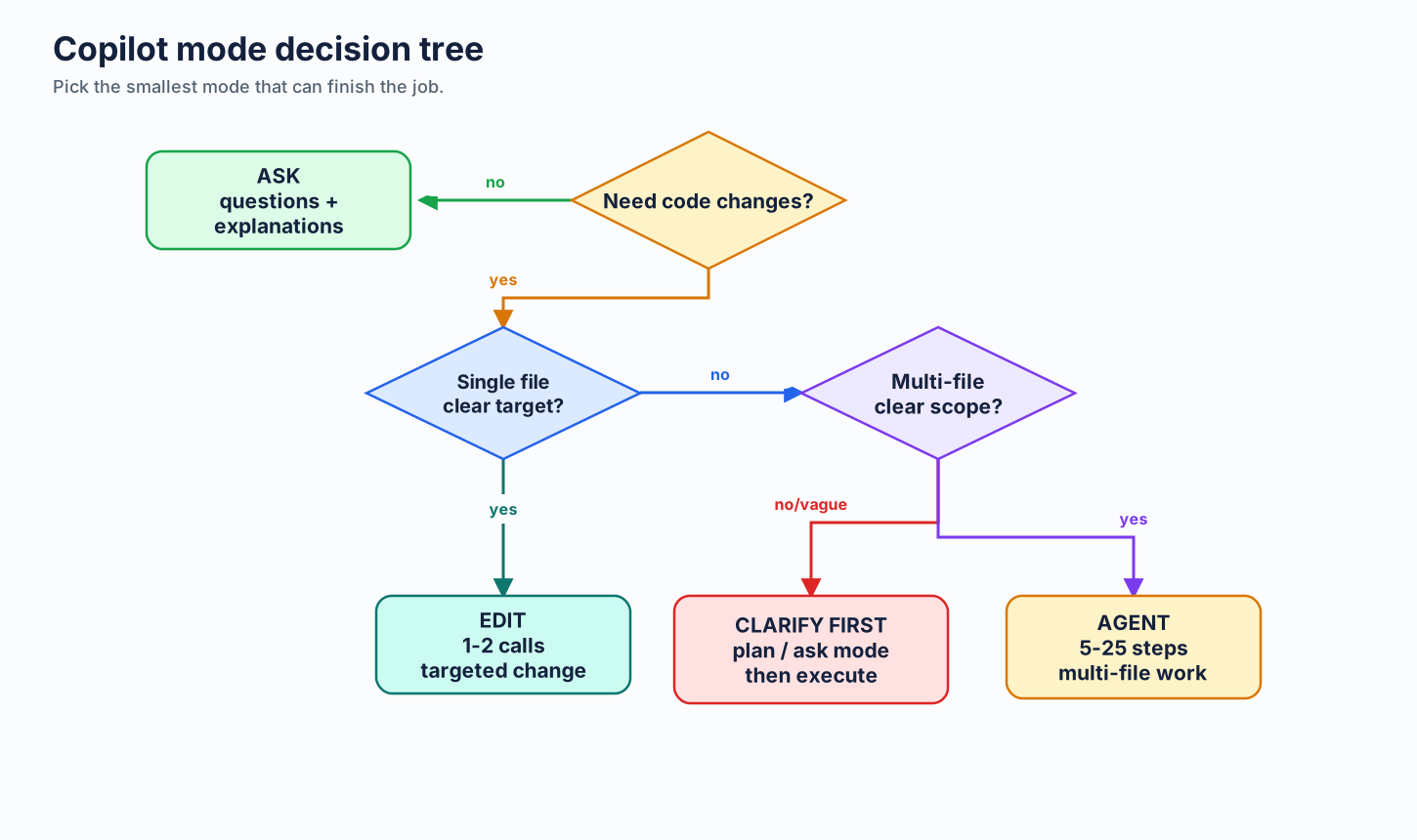
- Use Ask Mode for simple questions.
More fast wins
- Scope context with
applyTo. - Write precise prompts: target file, function, done condition.
- Retune prompts to target model.
- Audit MCP servers.
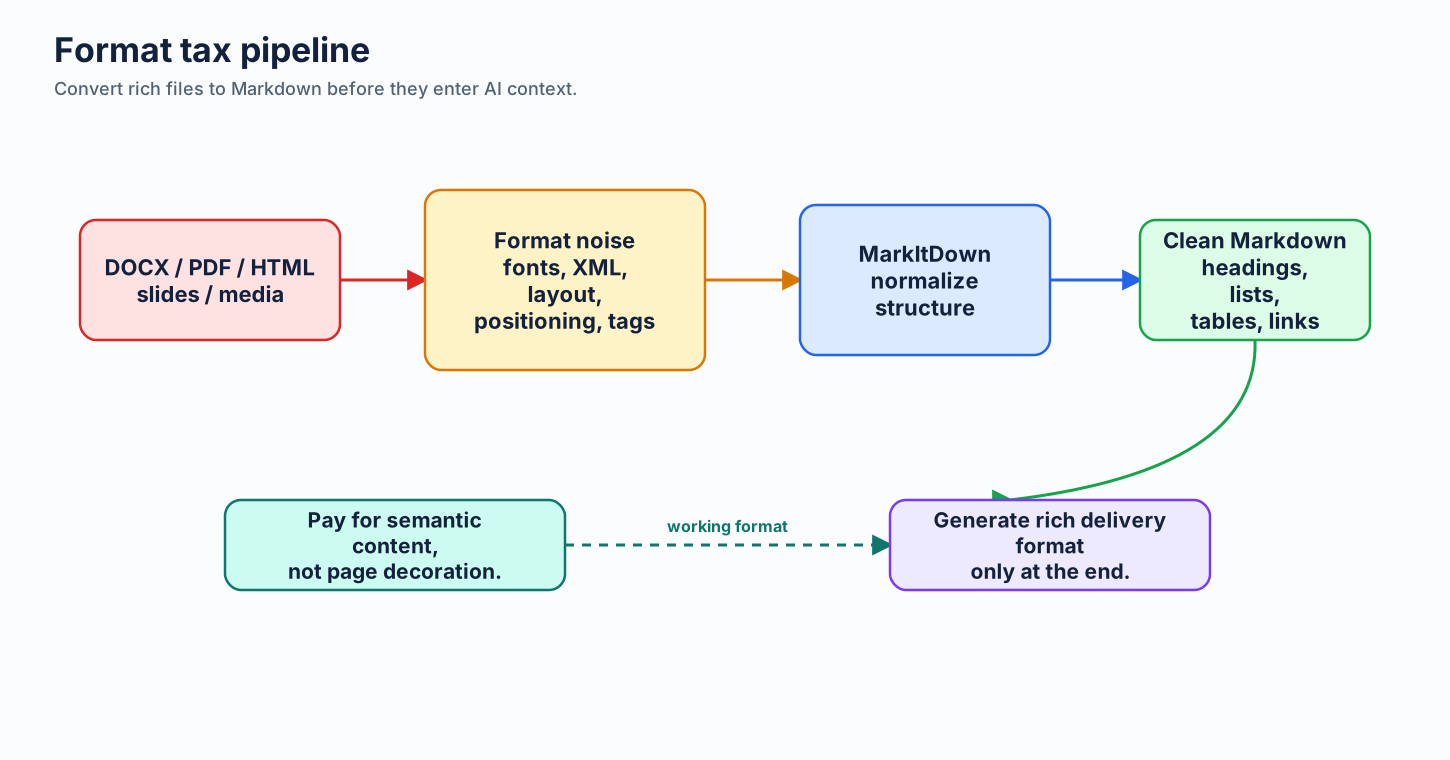
- Convert rich files to Markdown first.
More fast wins, continued
- Run
/chronicle cost tips&/chronicle improvein Copilot CLI. - Use AI Engineering Coach for VS Code habit review.
- Try CodeAct for long CLI tool chains.
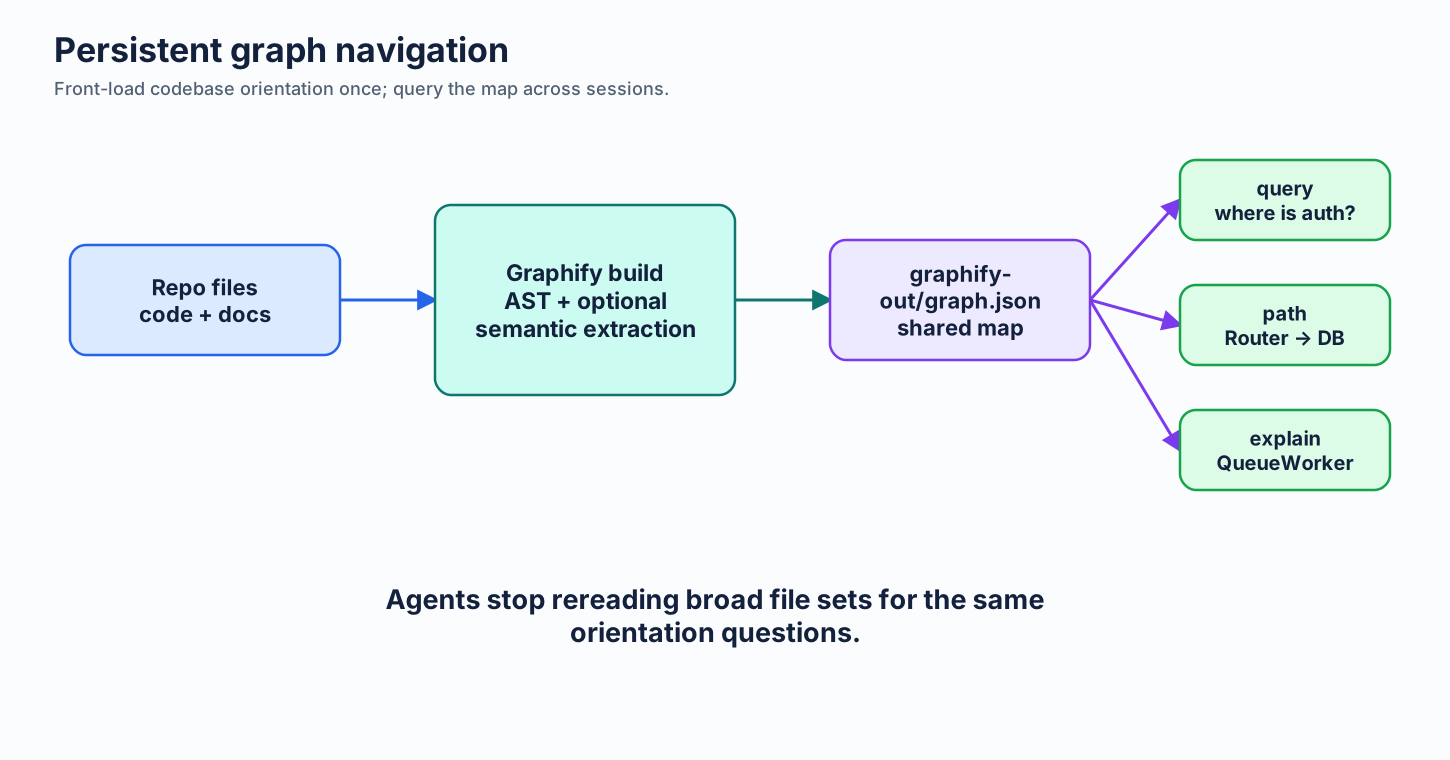
- Build a Graphify map for repeated codebase navigation.
The priority stack
Output first
One default changes every response.
Always-on second
Small baselines compound.
Mode third
Ask, Edit, Agent by task shape.
Governance fourth
Budgets and model policy cap spend.
Outcome fifth
Plan, route, verify, close.
Lab 0: baseline your habits
Goal
Identify your top 3 token leaks before learning techniques.
Do: mark each as green/yellow/red: output verbosity, instruction size, open tabs, Agent use, MCP count, model pinning, long chat history.
Deliverable: personal baseline + one "fix today" action.
Time: 10 minutes.
Part 1
Why tokens matter
Tokens drive cost, speed, limits, and context capacity.
Tokens are subwords
BPE behavior
- Common words can be one token.
- Rare words split into pieces.
- Punctuation and filler still count.
Core insight
Sure, I'd be happy to help! can burn around 10 tokens of zero technical value.
Cost model
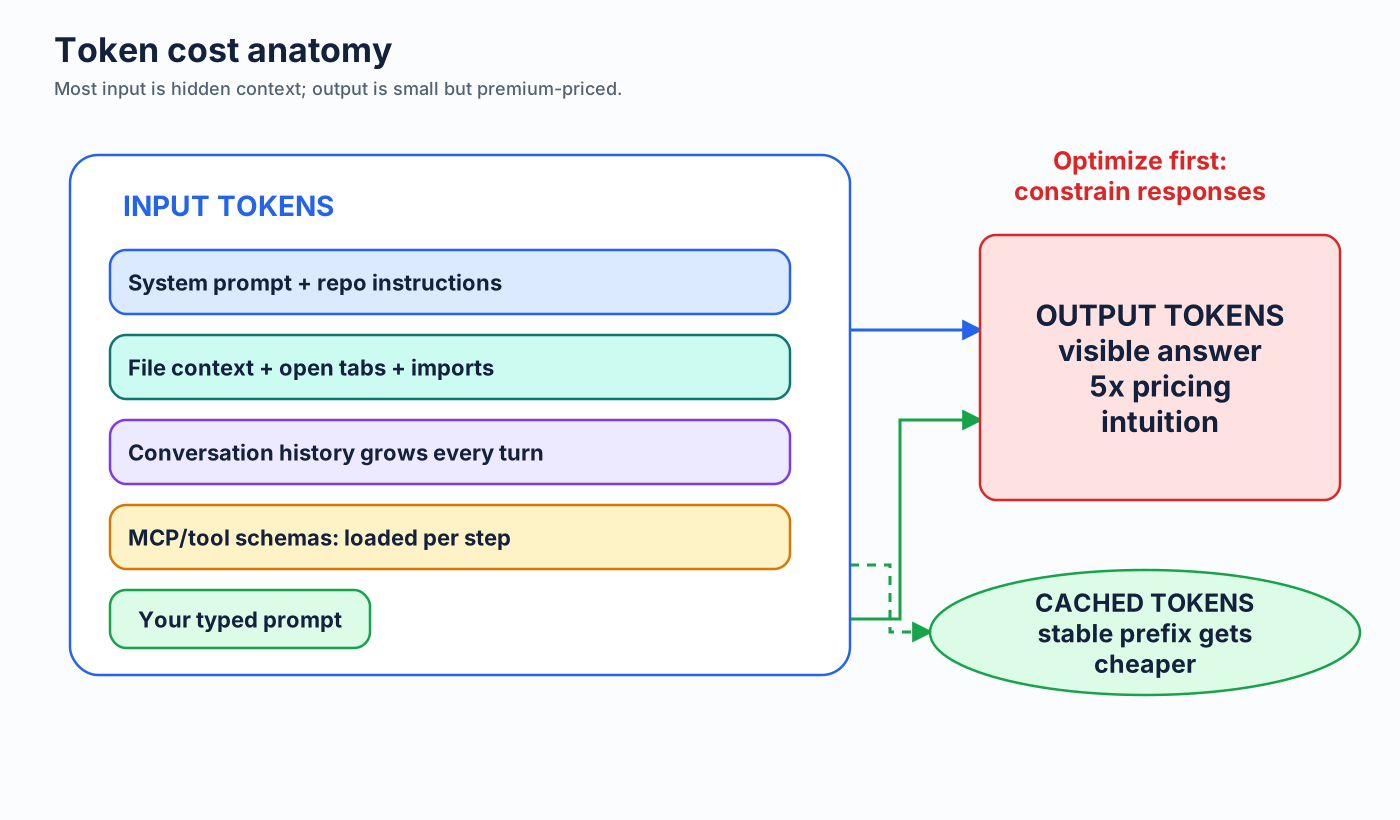
Output tokens usually cost materially more than input tokens in vendor pricing examples.
Input is bigger than your prompt
Context window
├─ System prompt
├─ copilot-instructions.md / AGENTS.md
├─ File context and open tabs
├─ Conversation history
├─ MCP tool schemas
└─ Your typed prompt
Your 20-word prompt can ride inside thousands of hidden tokens.
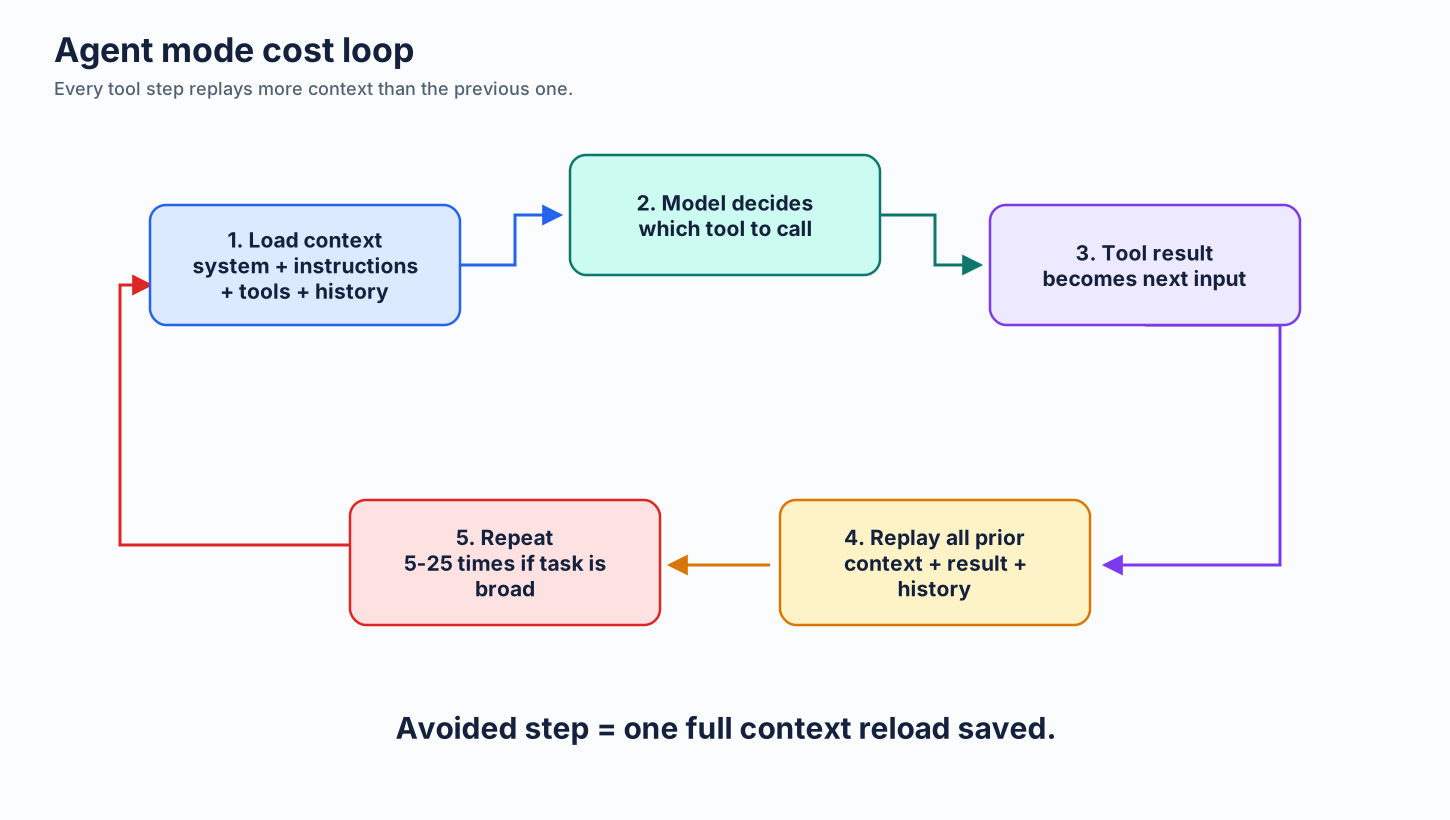
Coding Agent multiplier
One issue-to-PR run is not one request.
Agent steps
Plan, search, read files, edit, run tests, inspect failures, retry.
Compounding
Every step reloads baseline context and adds previous tool results.
Lab 1: token anatomy
Goal
Separate visible prompt from hidden context.
Do: choose one recent Copilot task. List likely context sources: open files, referenced files, instructions, history, tools, output.
Discuss: which source was most controllable?
Time: 15 minutes.
Part 2.1
Prompt compression
Say same thing in fewer tokens. Preserve technical precision.
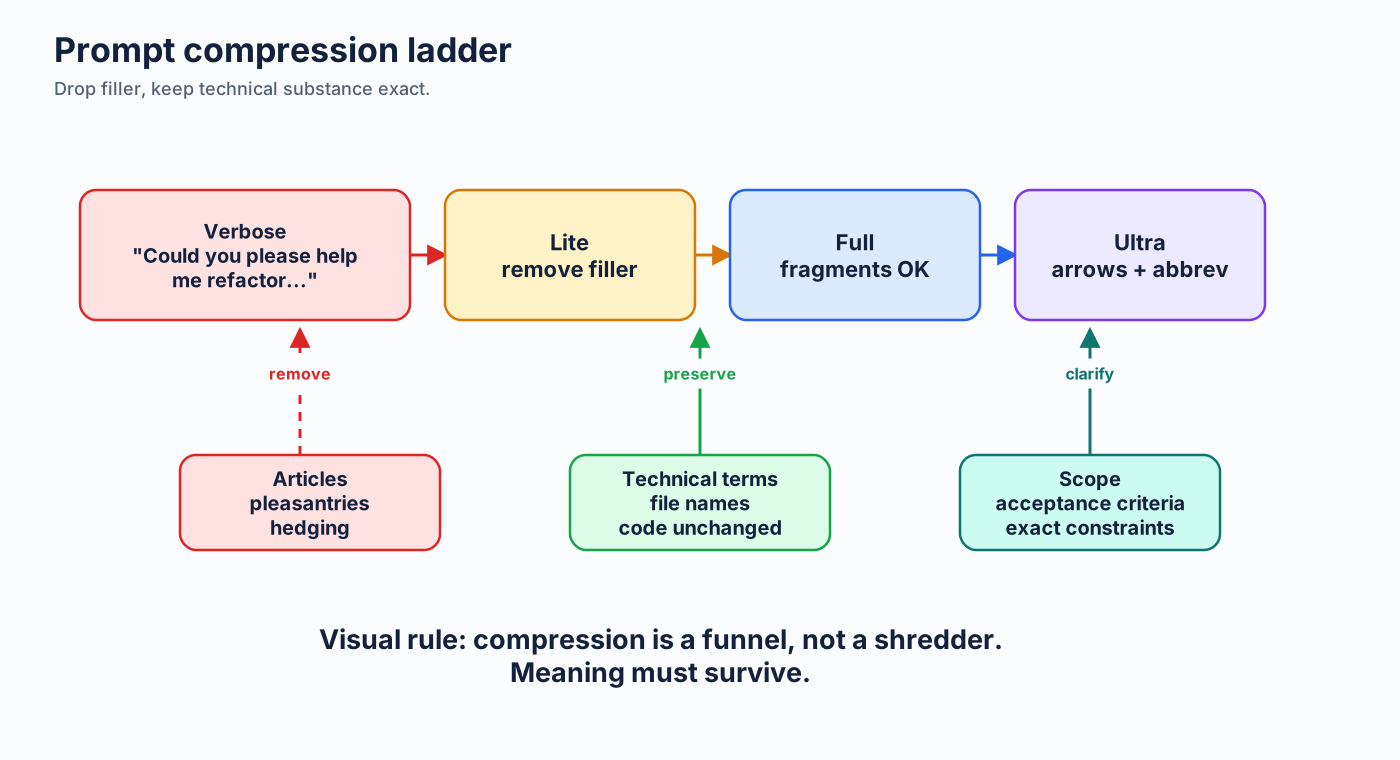
Caveman pattern
Drop
Articles, filler, pleasantries, hedging, softeners.
Keep
Technical terms, code, filenames, constraints, exact done condition.
[thing] [action] [reason]. [next step].
Before vs after
| Verbose | Caveman |
|---|---|
| Could you please review this pull request and let me know if there are any issues? | Review PR. Flag issues. |
| Can you explain what this error message means and how I should fix it? | Explain error. How fix. |
Compression levels
| Level | Style | Use when |
|---|---|---|
| Lite | Professional but tight | Client-facing, onboarding |
| Full | Fragments, no fluff | Daily developer prompts |
| Ultra | Abbrev, arrows, terse | High-volume, known domain |
Structured beats prose
POST /api/users
Validate:
- name: string, required
- email: string, required, valid
400 on validation fail
201 on success, return created user
Save to DB
Bullets and key-value pairs force clarity and reduce filler.
Code-centric prompting
Natural language
Create a function that takes numbers, filters negative values, doubles remaining values, returns sum.
Code-centric
fn(nums) -> filter(>0) -> map(*2) -> sum
Like getUserById but for emails. 404 if missing.
Guardrails as invariants
| Verbose procedure | Compressed invariant |
|---|---|
| Make sure every SQL query parameterizes values... | SQL: parameterized queries only. No concatenation. |
| Please write tests for any new code... | New code -> tests. Cover happy + error. |
Lab 2: prompt compression ladder
Goal
Rewrite one real prompt three ways: lite, full, ultra.
Do: preserve file names, line numbers, constraints, done condition. Drop only fluff.
Compare: which version is shortest without adding ambiguity?
Time: 20 minutes.
Lab 3: prompt A/B
Try this vs that
A: Could you take a look at auth and improve error handling?

B: File: src/auth/login.ts.
Bug: null user causes .email crash.
Fix: null guard before .email.
Test: add null-user case.
Done: targeted test passes.
Run: ask Copilot with A, then B. Compare file reads, clarifications, output length.
Part 2.2
Language comparison
English is usually most token-efficient for prompts.
CJK assumption fails
| Language | Sentence | Tokens | vs English |
|---|---|---|---|
| English | I met a huge dog | 5 | 1.0x |
| Spanish | Conoci a un perro enorme | 8 | 1.6x |
| Chinese | Chinese equivalent | 11 | 2.2x |
| Japanese | Japanese equivalent | 11 | 2.2x |
| Russian | Russian equivalent | 14 | 2.8x |
Why
- BPE tokenizers are trained heavily on English.
- Common English words often get one token.
- CJK text has fewer characters, but more tokens per character.
- Non-Latin scripts often cost more; transliteration can help.
Practical rule
If a user writes better in native language, quality can outweigh token cost. For optimization, English wins.
Lab 4: tokenizer reality check
Goal
Disprove or confirm language assumptions with actual token counts.
Do: pick one prompt. Translate to your strongest non-English language. Compare token counts in tokenizer tool.
Deliverable: team language guidance: when English is required, when native language is OK.
Time: 20 minutes.
Part 2.3
Context management
Control what gets sent. Biggest input wins are structural.
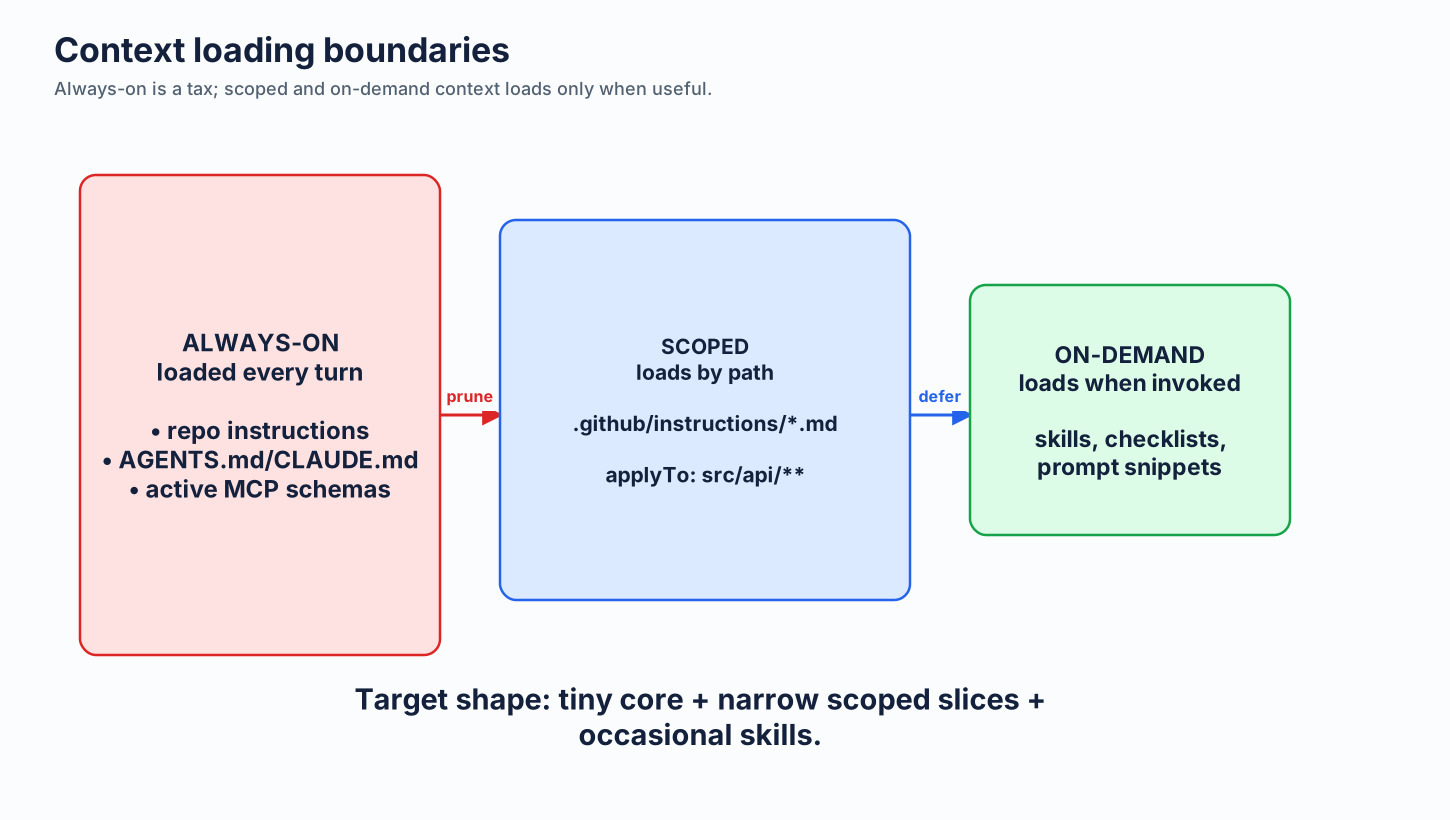
Always-on files cost every turn
.github/copilot-instructions.md, AGENTS.md, CLAUDE.md, and similar files can become persistent context.
Duplicate content can be paid twice when multiple files are loaded by different tools.
Instruction compression example
Terse like caveman. Technical substance exact. Only fluff die.
Drop: articles, filler (just/really/basically), pleasantries, hedging.
Fragments OK. Short synonyms. Code unchanged.
Pattern: [thing] [action] [reason]. [next step].
Around 50 tokens. Loaded on every interaction.
Context hygiene
- Close files not relevant to current task.
- Keep files focused and small.
- Ignore build output, vendor dirs, generated files.
- Use Content Exclusion for sensitive paths in Business/Enterprise.
- Start fresh conversations after topic changes.
Use scoped instructions
---
applyTo: "src/api/**/*.ts"
---
API conventions:
- Routes in src/api/routes/. Handlers thin, logic in services/.
- Validate with zod.
- Errors via Result<T,E>, never throw.
Pay path-specific guidance only when relevant files are in scope.
Always-on vs conditional vs on-demand
Normalize rich files first
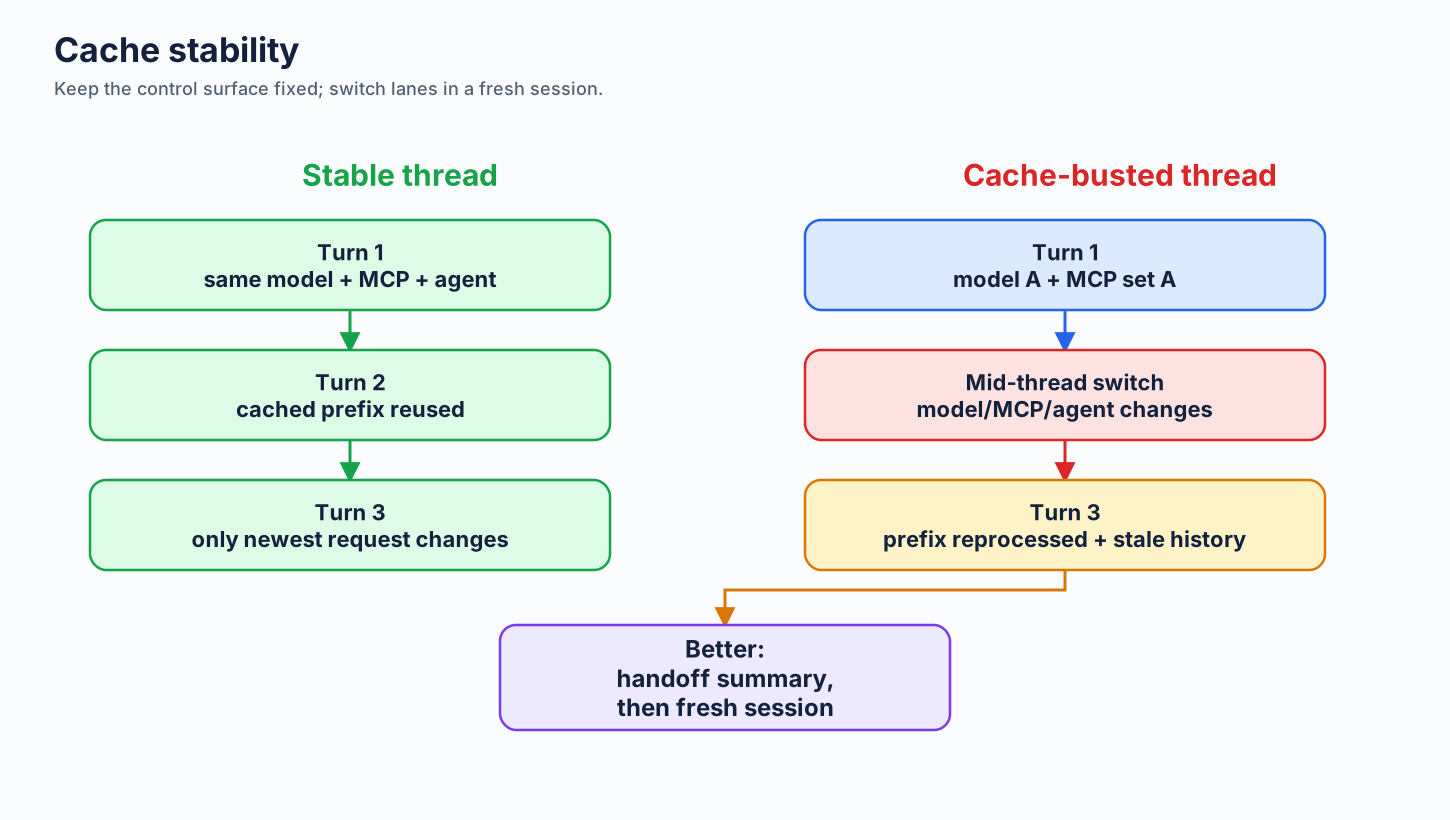
Cache-friendly behavior
Persistent graph navigation
Enterprise note: Content Exclusion
Customer-side action
Configure Content Exclusion for sensitive files, generated bundles, large data files, and regulated paths.
Important: treat this as privacy/policy control first, token-saving side effect second. Check current surface support in official docs.
Lab 5: context audit
Goal
Find always-on context that should become scoped or on-demand.
Do: inspect repo instructions, AGENTS/CLAUDE files, open tabs, generated files, MCP config.
Deliverable: three-column list: keep always-on, move to applyTo, move on-demand/delete.
Time: 30 minutes.
Part 2.4
Output control
Tell model what not to say. Highest per-token ROI.
Default line
Code only, no explanation.Best for generation tasks when team already understands desired change.
Format constraints
| Instruction | Use when |
|---|---|
| Answer in one sentence | Quick decision or explanation |
| 3 bullets max | Scan-friendly summary |
| Reply as JSON | Machine-readable extraction |
| Yes/no, then one line why | Review gate |
| Diff only | Patch inspection |
Project default
Be concise. No explanations unless asked.
Code only for generation tasks.
Bullets over paragraphs.
Override when learning, debugging, or teaching: ask for explanation explicitly.
Lab 6: output A/B
Try this vs that
A: Add input validation to processOrder().

B: Add input validation to processOrder().
Code only. No explanation. Minimal diff.
Measure: response length, explanation tokens, diff usefulness.
Time: 15 minutes.
Lab 7: format forcing
Goal
Practice asking for bounded output.
Prompts: "3 bullets max", "table only", "JSON only", "one-line verdict + risk".
Deliverable: team snippet library for common Copilot outputs.
Part 2.5
Workflow optimization
Use cheaper interaction shapes before optimizing words.
Commit and PR text matter
Commit
feat: add password reset via settings page
Body only when "why" is not obvious.
Review
L42: bug: user can be null. Add guard before .email.
One-line, actionable, severity-coded.
Ask vs Edit vs Agent
Auto model default
Auto is a good baseline: supported Auto pool, org policy-aware, discount on eligible paid-plan Chat usage per docs.
Auto does not mean "escalate into every premium model." Pin premium deliberately.
Retune prompts when model changes
Target model: GPT-5.5.
Guide: <official prompting guide URL>
Files: .github/copilot-instructions.md, .github/instructions/*.md
Adapt prompts to guide. Preserve behavior. Reduce rework.
Show diff only.
When not to compress
- Security warnings.
- Irreversible operations.
- Onboarding and teaching.
- Regulatory/compliance language.
- Complex instructions where fragments add ambiguity.
Close loop with usage coaching
/chronicle
Copilot CLI session history (not VS Code). Use /chronicle cost tips for token spend and /chronicle improve for recurring confusion.
AI Engineering Coach
VS Code local extension. Finds anti-patterns, context health, skill opportunities.
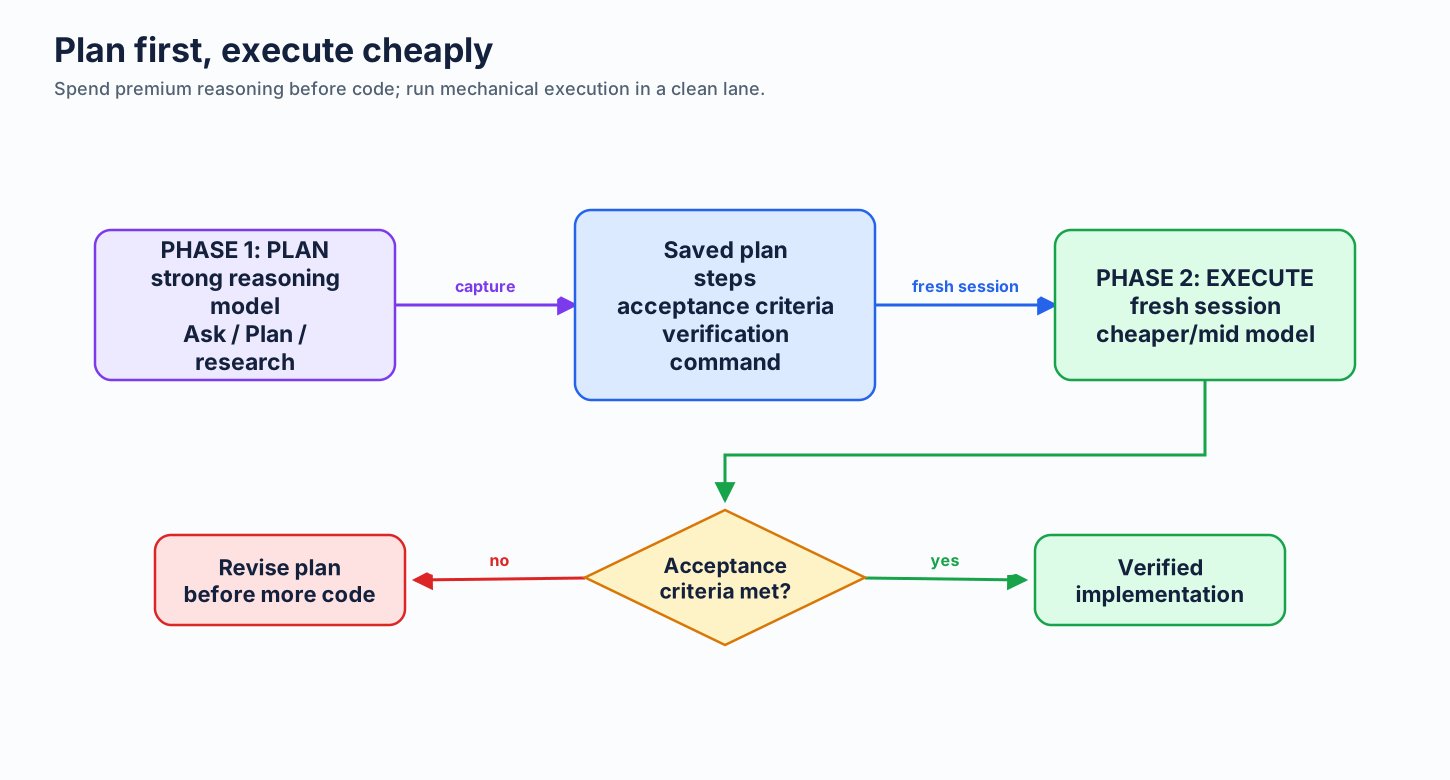
Plan first, execute cheaply
Lab 8: mode routing drill
Goal
Stop using Agent Mode for one-shot work.
Do: classify 20 sample tasks as Ask/Edit/Agent/Coding Agent. Defend choice.
Deliverable: team mode-routing cheat sheet.
Time: 20 minutes.
Lab 9: model routing drill
Goal
Prevent expensive-model pinning by default.
Do: map tasks to Auto, included/lower-cost, standard, premium. Include reasoning-effort choice if available.
Deliverable: model escalation rules.
Part 2.6
Always-on context problem
More context can make agents worse and cost more.
Research signal
| Finding | Observed impact |
|---|---|
| LLM-generated context files | Hurt in 5/8 settings |
| Average correctness | Down about 2% |
| Token cost | Up 20-23% |
| Reasoning overhead | Up about 22% in cited setup |
Why context hurts
Redundancy tax
Repeats facts agent can discover.
Attention tax
Important rules get lost in middle.
Anchoring trap
Outdated tool guidance over-influences agent.
Signal/noise
Routine facts dilute landmines.
Keep landmines only
| Keep | Delete |
|---|---|
Use uv instead of pip | This is a Python project |
| DB migrations must run in order | We use PostgreSQL |
| Do not refactor auth module; audit pending | We use JWT auth |
| Deploy requires VPN | Main branch protected |
Bug tracker model
Start almost empty.
Agent trips on something -> add one line.
Root cause fixed -> delete that line.
Instruction files should grow and shrink, not accumulate like a wiki.
Lab 10: landmine pruning
Goal
Cut context without losing correctness.
Do: mark each instruction as discoverable, style, landmine, stale, duplicate. Delete or scope everything except true always-on landmines.
Deliverable: 10-line max instruction file draft.
Time: 35 minutes.
Part 2.7
MCP and tool costs
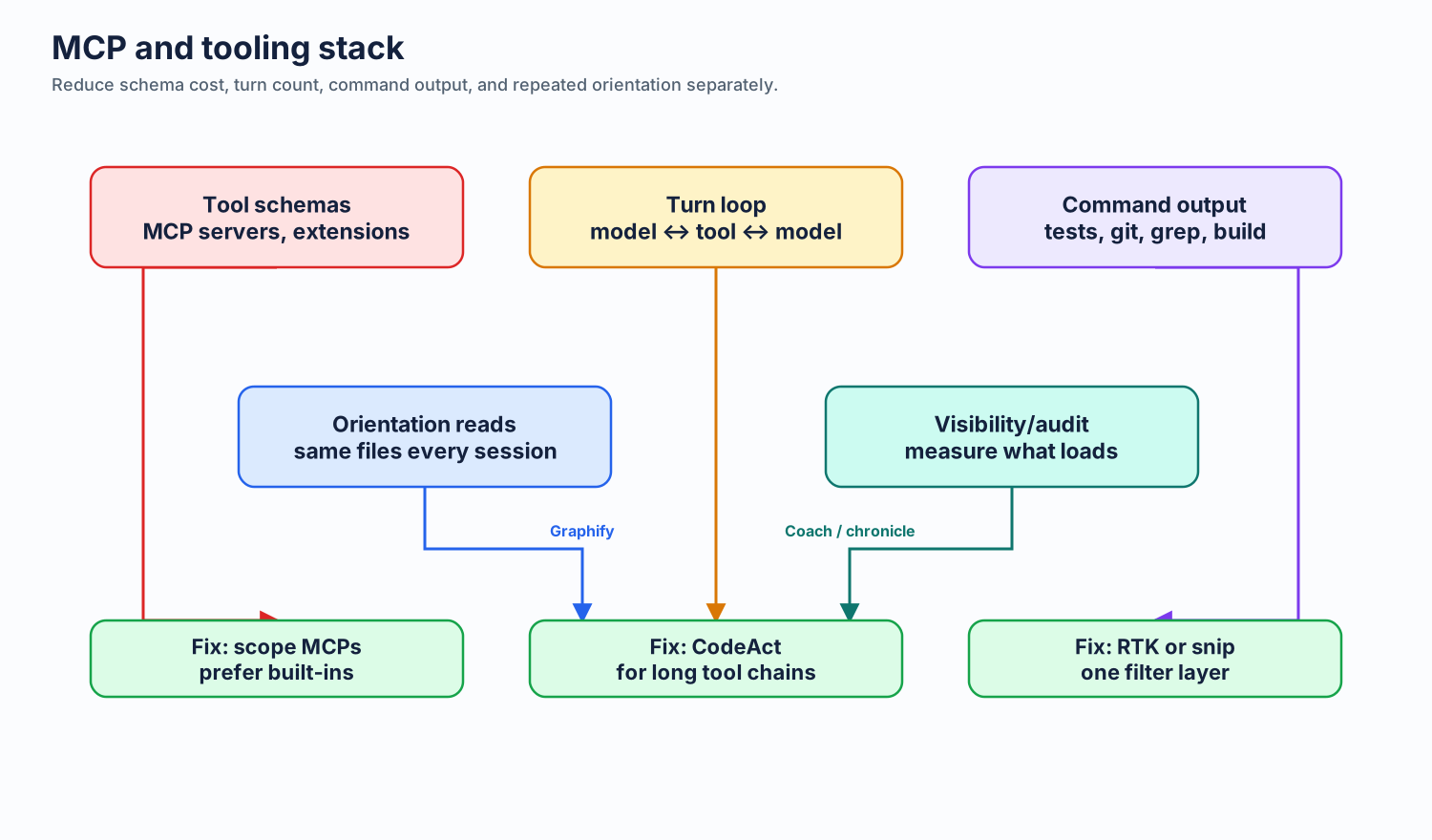
Tool schemas are hidden token tax.
Measure first
/context

System/Tools: MCPs + instructions + system prompt
Messages: conversation history
Free Space: remaining context
In VS Code, estimate active MCP servers x tools x about 200 tokens/tool.
Every tool costs tokens
| Component | Approx cost |
|---|---|
| Name + description | 20-50 tokens |
| Simple parameter schema | 30-80 tokens |
| Complex parameter schema | 100-300 tokens |
| Total per tool | 100-500 tokens |
Multiplication problem
10 MCP servers
x 5 tools each
x 200 tokens/tool
= 10,000 tokens per step

15 agent steps = 150,000 schema tokens
Audit rule
- Disable servers not needed now.
- Use per-workspace config, not global everything.
- Prefer built-in tools over duplicate filesystem MCPs.
- Use skills for occasional capabilities.
- Scope large plugins by namespace/mode when supported.
Tool output compression
RTK
Rust CLI proxy filters noisy shell output: tests, git diff, grep, logs, file listings.
rtk init --copilotsnip
YAML-extensible command filters with local savings stats and team-maintained rules.
snip init --agent copilotPick one output filter layer per command path. Do not stack RTK and snip by default.
One tool per layer
| Layer | Tool | Reduces |
|---|---|---|
| Workflow turns | CodeAct | Repeated model-tool loops |
| Command output | RTK or snip | Verbose shell results |
| Command choice | minimal-context-tools | Broad search/read behavior |
| Codebase orientation | Graphify | Repeated file rereads |
| Visibility | Chronicle / Coach | Waste you would miss |
Azure MCP case pattern
One large plugin can dominate System/Tools budget.
--namespace appservice --namespace cosmos --namespace keyvault --namespace storageScope by service/persona. Avoid "all tools" mode unless truly needed.
Lab 11: MCP audit
Goal
Remove hidden schema overhead.
Do: inventory enabled MCP servers, tool counts, global vs workspace scope, owner, frequency of use.
Deliverable: keep/disable/scope table + restart plan.
Time: 30 minutes.
Enterprise lab: tool policy
Customer-side action
Define approved MCP servers by persona: developer, data, platform, security, support.
Deliverable: default MCP profile per team + exception process for large plugins.
Part 3
Comparisons and data
Use evidence to pick habits with best impact-to-effort.
Same task, different cost
| Technique | Prompt | Tokens |
|---|---|---|
| Verbose | Please add comprehensive error handling... | ~40 |
| Caveman lite | Add error handling. Cover null, types, network. | ~16 |
| Caveman full | Error handling. Cover: null, bad type, net error. | ~12 |
| Ultra | Error handling: null/bad-type/net-err. | ~7 |
Big winners
- Caveman-speak + precise prompts.
- Code-only / constrained output.
- Shrink always-on context.
- Ask Mode for simple questions.
- Audit MCP servers.
- Retune prompts after model changes.
Quality curve
Savings:  lite ---- full ---- ultra ---- extreme
Risk:     low  ---- low  ---- medium --- high
Sweet spot: full caveman. Maximum return, negligible risk for technical users.
Lab 12: prioritize techniques
Goal
Pick changes by impact, effort, risk.
Do: rate each technique 1-5 for impact, effort, adoption friction, governance need.
Deliverable: team top 5 and "do not adopt" list.
Time: 25 minutes.
Part 4
Practical setup
Turn techniques into repo and team defaults.
Repo setup steps
- Create compressed
.github/copilot-instructions.md. - Add compressed project-specific rules.
- Split path-specific guidance with
applyTo. - Use Auto by default; pin only with reason.
- Add
copilot-setup-steps.ymlfor Coding Agent.
Starter instruction template
Terse like caveman. Technical substance exact. Only fluff die.
Drop: articles, filler, pleasantries, hedging.
Fragments OK. Short synonyms. Code unchanged.
Code only for generation tasks. No explanation unless asked.
Minimize tool calls. Batch related reads/edits.
Coding Agent setup
# .github/copilot-setup-steps.yml
steps:
  - name: Install dependencies
    run: npm ci
  - name: Build
    run: npm run build
Prevents discovery by trial and error. Saves agent steps.
Precise issue template
Bug: login fails when email contains "+".
File: src/auth/login.ts, validateEmail() L42.
Fix: URL-encode email before OAuth provider call.
Test: add user+tag@example.com case.
Done: targeted test passes.
Build habit over 4 weeks
| Week | Habit |
|---|---|
| 1 | Compressed instructions + Ask Mode for questions |
| 2 | Caveman-lite prompts |
| 3 | Caveman-full + structured formats |
| 4 | Code-only defaults + reusable snippets outside always-on context |
Agent mode controls
{
  "chat.agent.maxRequests": 10,
  "github.copilot.chat.agent.model": "auto"
}
Cap runaway sessions carefully. Increase only when task requires it.
Agent mode cost loop
Session harness checklist
model
mode
agent/profile
active MCP/tools
output filter
repo instructions
Choose before the session starts. Stable harness = predictable cost and cache behavior.
Lab 13: repo implementation
Goal
Create a repo-ready token optimization PR draft.
Do: draft copilot-instructions.md, one scoped instruction file, one Coding Agent setup step, one issue template snippet.
Deliverable: branch or patch proposal.
Time: 45 minutes.
Part 4.2
Model selection and pricing
Separate Copilot docs, UBB framing, and vendor token pricing.
Three pricing views
| View | Answers |
|---|---|
| GitHub Copilot docs | Plan availability, model access, Auto behavior, published signals |
| UBB framing | AI-credit budgets and governance after cutover |
| Vendor API pricing | Input vs output intuition, not Copilot billing table |
Auto: practical meaning
- Chooses from supported Auto pool.
- Subject to plan and org policy.
- Based on health and performance.
- Discounted on eligible paid-plan Chat usage.
- Does not automatically escalate to every premium model.
Reasoning effort
| Effort | Use for |
|---|---|
| Low | High-volume simple chat/classification |
| Medium | Typical coding and tool-heavy work where supported |
| High/max | Architecture, security, novel decomposition |
Use only on models that expose this control.
Anti-patterns
- Leaving premium model pinned all day.
- Assuming Auto jumps to premium when task gets hard.
- Equating vendor API pricing with Copilot billing.
- Enabling every premium model for whole org first.
- Ignoring plan/model availability.
Lab 14: model escalation policy
Customer-side action
Define when users may pin premium models and when Auto is required.
Do: map workflows to default model lane, escalation trigger, expected value, rollback signal.
Deliverable: one-page model policy draft.
Time: 30 minutes.
Part 4.3
Enterprise governance
Admin controls cap spend. Prompt habits improve efficiency.
Spend levers
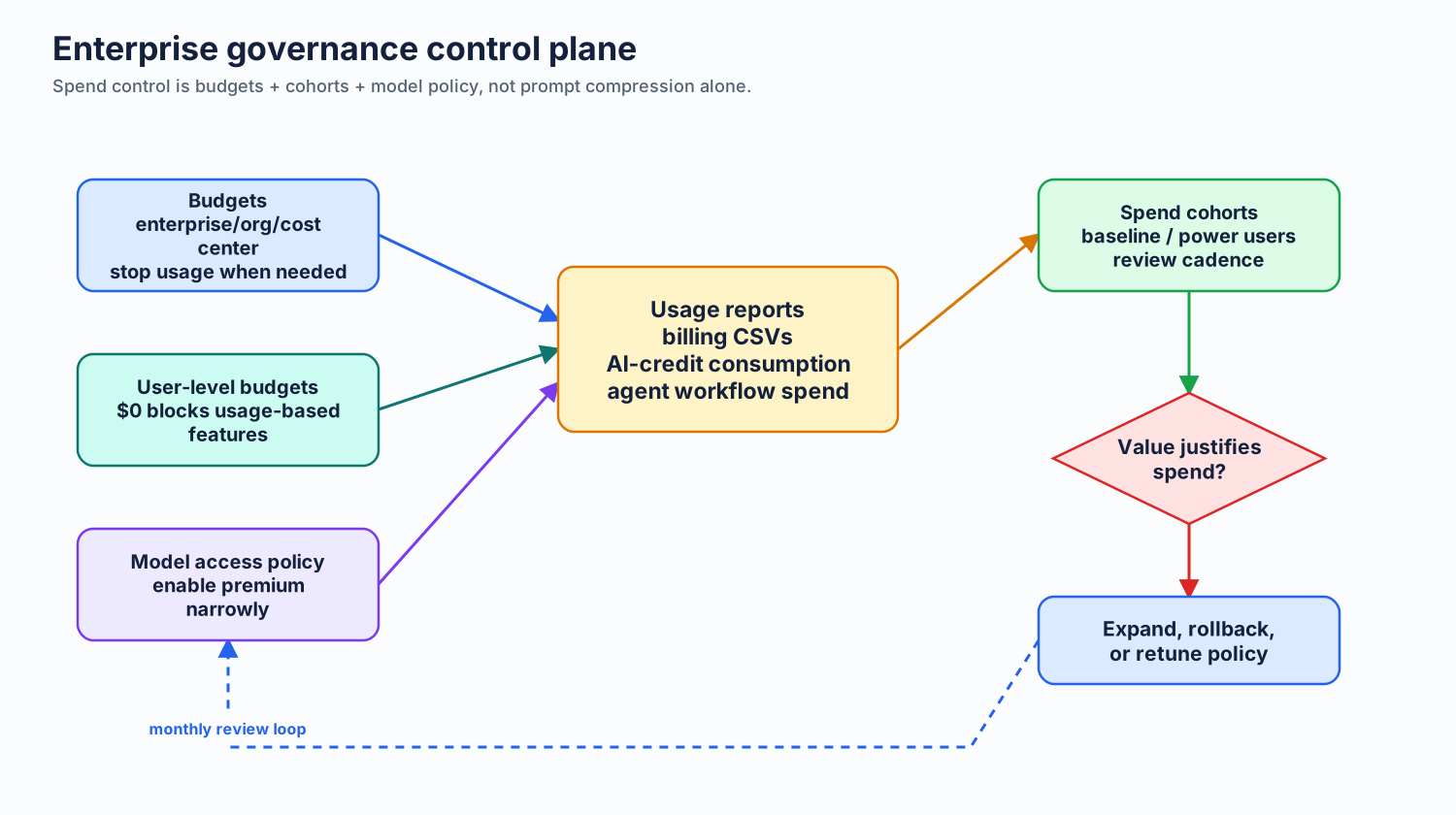
Prompt compression does not cap spend. It reduces waste inside allowed usage.
Set budgets first
Customer-side action
Set enterprise/org/cost-center budgets. Enable alerts early. Enable stop-usage after reporting is trusted. Review monthly.
User-level tightening
- Baseline users: low AI-credit budget.
- Power users: higher budget with job need.
$0budget: no usage-based features.- Review monthly and downgrade unused allocations.
Review models before enablement
| Question | Decision |
|---|---|
| Which workflows need premium? | Enable narrowly |
| Which teams create measurable value? | Assign higher budgets |
| Which users can stay on Auto? | Keep default path cheap |
| What rollback signal? | Usage up, value flat |
Instruction scope governance
- Org instructions: broad GitHub.com policy and review reminders.
- Repo instructions: IDE workflow defaults and coding rules.
- Path-specific instructions: local rules where context pays.
- Do not assume org instructions apply everywhere; check docs.
Separate orgs: fallback only
Useful for different model policies or billing boundaries when org structure already matches groups.
Costs: admin overhead, license complexity, user sprawl, SCIM/cost-center constraints.
Measure right thing
- Which teams exceed baseline?
- Which users drive AI-credit usage?
- Which models improve outcomes?
- Which agent workflows spend without delivery value?
June 1 cutover checklist
- Move from request counters to AI-credit budgets.
- Decide pooled vs user-level budgets.
- Review model availability before premium becomes direct spend.
- Remind teams completions/next edits stay outside AI-credit billing.
- Watch long chat and agent workflows first.
Lab 15: budget rollout
Customer-side action
Design budget rollout for one enterprise account.
Do: choose pilot org, cost center, baseline budget, alert threshold, stop-usage rule, user exceptions.
Deliverable: budget operating model.
Time: 35 minutes.
Lab 16: governance tabletop
Scenario
Agent sessions spike AI-credit usage 4x in one team. Delivery output unchanged.
Decide: budget action, model policy action, instruction/context action, MCP audit action, comms plan.
Time: 25 minutes.
Part 4.4
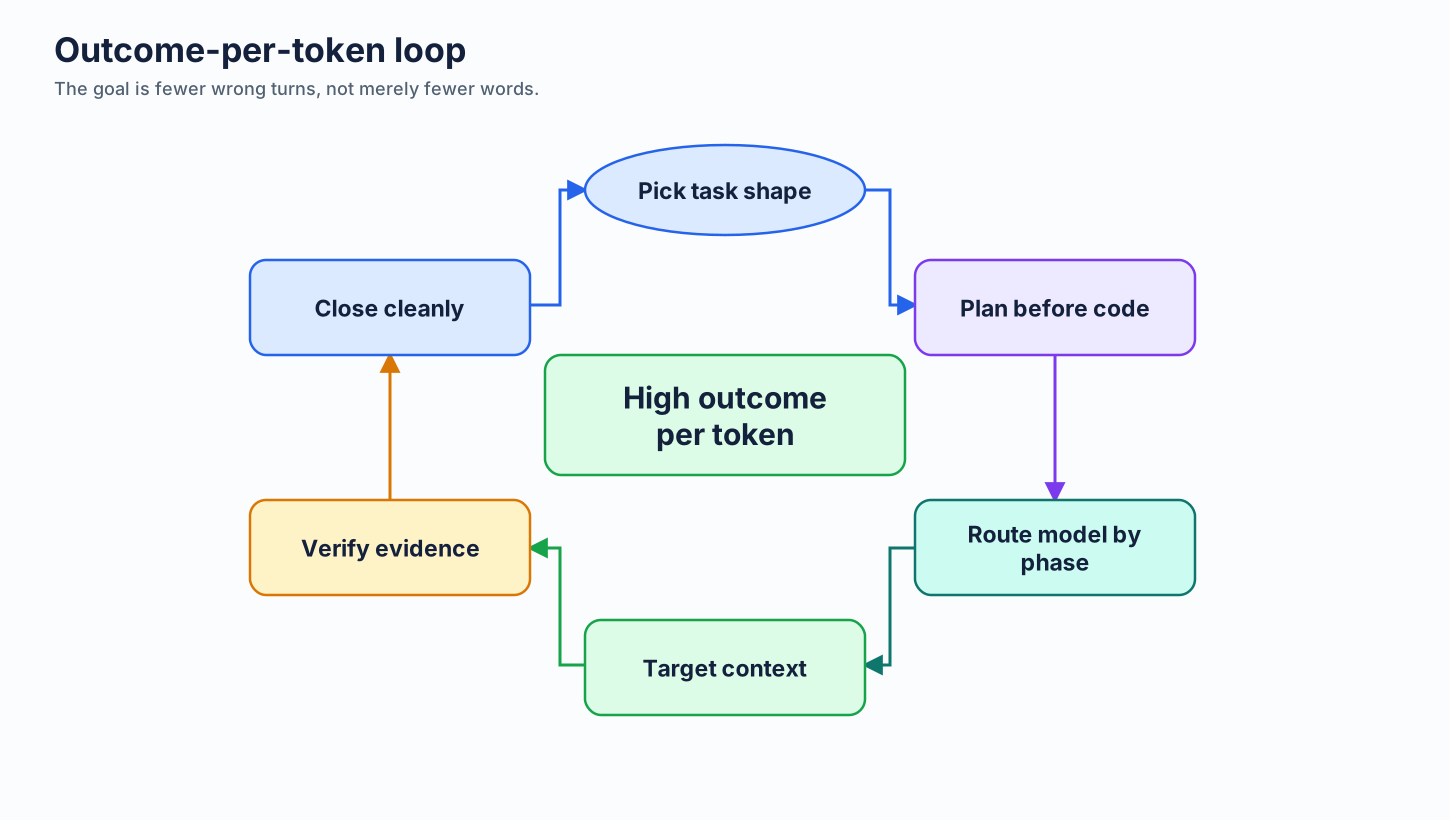
Outcome per token
Optimize for accepted work, not the shortest prompt.
The metric
A short prompt that causes wrong-direction work is more expensive than a longer plan that lands correctly.
Agentic cost research signal
| Finding | Implication |
|---|---|
| Agentic coding can consume far more than chat | Do not extrapolate simple-chat cost |
| Same task can vary widely across runs | Use budgets and stop rules |
| More tokens do not guarantee accuracy | Optimize loop quality |
| Input dominates agentic cost | Context hygiene matters |
Outcome loop
Skills as practices
| Skill | Token effect |
|---|---|
| Brainstorming | Prevents early lock-in |
| Planning | Reduces guessing during execution |
| Greenness | Avoids debugging unknown baseline failures |
| Verification | Prevents false completion |
| Impeccable close | Prevents review churn |
| Branch-close discipline | Stops stale context carryover |
Skill libraries: borrow patterns
SDLC
Superpowers, planning, TDD, branch finish.
Handoff
agent-toolkit patterns for requirements, plans, entropy control.
Guardrails
Secrets, cloud, DB, Docker, dependency, and retry-stop cautions.
QA / writing
Browser evidence, writing review, QA depth on demand.
Do not install every skill. Load only what changes the next action.
Skill library adoption signal
Stars show attention, not quality. Judge by whether the skill changes the next agent action.
Plan first, execute cheaply
Day-to-day model guidance
- Auto first for unknown everyday work.
- Lightweight for tiny bounded work.
- Mid-tier for normal implementation after clear plan.
- Powerful for planning, architecture, hard debugging.
- Fresh session when changing model/tool/agent lane.
Benchmark caveats
- Benchmarks choose candidates; repo tasks choose defaults.
- Harness, tools, retrieval, and reasoning effort affect scores.
- Compare outcome and cost together, not score alone.
- Label sources: verified, directional, anecdotal.
Capstone
30 day token optimization plan
Turn workshop into customer rollout.
Week-by-week rollout
| Week | Team action | Admin action |
|---|---|---|
| 1 | Output defaults + Ask Mode | Usage baseline |
| 2 | Instruction pruning + scoped rules + Markdown conversion | Budget pilot |
| 3 | MCP audit + output filter + Graphify pilot | Model access review |
| 4 | Plan-first execution + verification/close discipline | Monthly outcome-per-token review |
Capstone lab
Goal
Create customer-specific action plan.
Sections: repo changes, user habits, MCP/tool policy, model policy, budgets, reporting, owner, due date.
Deliverable: 30 day plan ready for customer sponsor.
Time: 30 minutes.
Final checklist
Developer
- Code-only default
- Ask/Edit/Agent routing
- Concise prompts
- Plan first, fresh sessions
Repository
- Tiny always-on instructions
- Scoped
applyTofiles - Coding Agent setup steps
- Precise issue templates
- Graphify map where useful
Platform
- MCP profiles
- Content Exclusion
- Model access policy
- RTK or snip output strategy
- One tool per layer
Enterprise
- Budgets
- User-level caps
- Usage reporting
- Monthly outcome review