Practitioner briefing
GitHub Copilot Token Optimization
18 actions for cheaper, faster, more reliable AI-assisted engineering.
Need the full training? Open the 8-hour workshop.
Outcome: useful work per token
Spend less
Reduce unnecessary input, output, and tool overhead.
Move faster
Keep context focused. Avoid expensive rework loops.
Ship better
Plan, verify, and use the right agent mode for the task.
Community guidance, not official GitHub or Microsoft policy.
Know what you pay for
Input
System prompt, instructions, files, history, tool schemas, and your prompt.
Output
Responses, reasoning, and tool calls. Usually the highest-cost token type.
Cached input
Stable request prefixes can be reused at a lower effective cost.
Agent loops
Every read, command, retry, and rework step compounds cost.
Priority stack
- Constrain output. Stop paying for prose you do not need.
- Shrink context. Keep always-on instructions and files focused.
- Reduce tool overhead. Load only needed MCP tools and compress command output.
- Avoid rework. Choose the right mode, model, plan, and verification.
1. Default to constrained output
Use short, explicit formats for code tasks, reviews, and summaries. Output control compounds across every interaction.
Do not compress reasoning or evidence when the task needs it.
2. Compress always-on instructions
Keep
Project landmines, commands, naming, architecture rules, output constraints.
Remove
Boilerplate, discovery facts, duplicate rules, occasional workflow checklists.
Every token in .github/copilot-instructions.md is paid repeatedly. Put rare guidance in scoped or on-demand files.
3. Target context deliberately
- Close unrelated editor tabs and avoid attaching broad files.
- Use
applyToinstruction files for path-specific rules. - Convert rich input to Markdown before AI work.
- Send the relevant plan and files, not an entire project history.
4. Protect cached prefixes
For one long task, keep this stable:
Changing the lane or harness can lose cached-prefix savings. Start a fresh chat with a compact handoff instead.
5. Use the smallest capable mode
Ask
Questions, explanations, decisions. No tools needed.
Edit
Bounded changes with known files and intent.
Agent
Multi-file work that needs exploration, commands, and verification.
Do not use Agent mode for a question that Ask mode can answer.
6. Route models by task
- Auto first for everyday work.
- Lightweight for lookup, syntax, small mechanical edits.
- Strong reasoning for planning, architecture, and hard debugging.
- Execution lane after the hard decisions are written down.
Choose reasoning effort before the long session. Do not raise it mid-thread.
7. Plan, then execute fresh
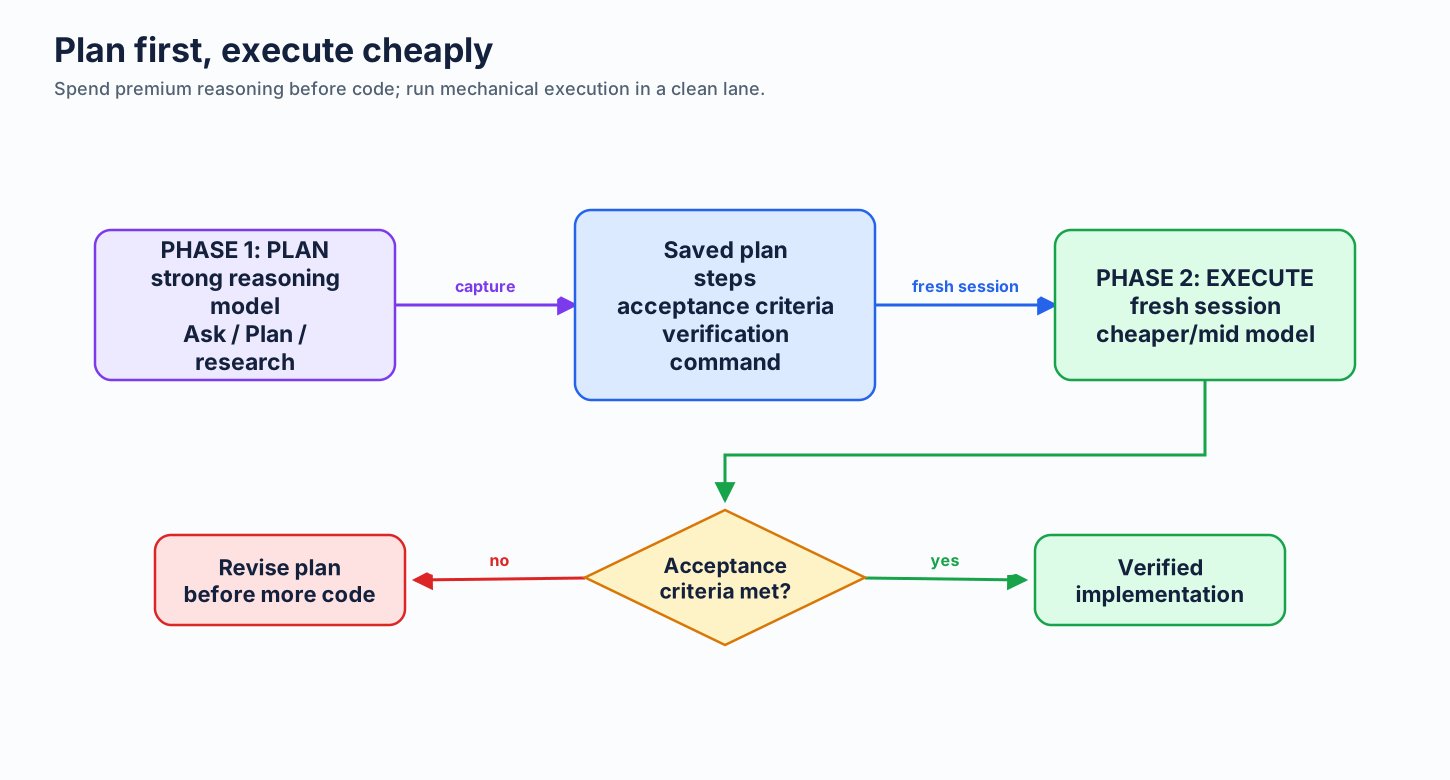
Capture acceptance criteria, likely files, risks, and verification. Start execution with only that handoff.
8. Keep the MCP baseline small
- Every enabled MCP tool schema is repeated in agent context.
- Disable servers and extensions not needed for this repo or task.
- Use a clean profile or focused agent for repeat workflows.
- Run
/contextin Copilot CLI to see what is loaded.
9. Compress shell output once
RTK
Compiled defaults for common developer command output.
snip
YAML pipelines and local savings tracking.
Choose one filter layer per command path. Do not stack both by default.
10. Reuse codebase orientation
Graphify maps a large repo once, then agents query structure instead of repeatedly reading broad file sets.
graphify query "where is auth middleware?"
graphify path "Router" "Database"
Best for large repos and repeated agent sessions. Skip it for small, one-off changes.
11. Make token use visible
In-session
Use /context to inspect Copilot CLI context pressure and loaded tools.
Cross-session
Tokentop shows local live tokens, cost, burn rate, and budget alerts.
Visibility finds waste. It does not compress context by itself.
12. Set a stable session harness
Choose it before long work. If the task needs a different harness, create a fresh session rather than mutating a long transcript.
13. Verify before completion
- Name the acceptance criteria.
- Run the targeted test, build, or check.
- Report evidence, not a generic “done.”
Small verification cost prevents a new debugging or review session later.
14. Adopt and sustain
Week 1
Constrain output. Trim repo instructions.
Week 2
Route Ask, Edit, and Agent deliberately.
Week 3
Audit MCP tools and command output.
Week 4
Plan-first workflows, cache stability, and usage review.
Every task: constrain output, target context, choose the harness, plan, and verify.